访问控制
功能是可管理的 Unity 目录对象。 对功能的访问权限由 CREATE FEATUREREAD FEATUREMANAGE Unity 目录权限控制。 有关完整说明,请参阅 Unity 目录特权参考。
CREATE FEATURE:在模式中创建特征所必需。create_feature并且register_feature需要CREATE FEATURE父架构。 遵循最低特权原则,在架构级别授予CREATE FEATURE;还可以在目录中授予它,以允许在该目录中的任何架构中创建功能。READ FEATURE:读取特征元数据必须。get_feature,create_training_set, ,list_materialized_features以及 需要READ FEATURE在该功能上。 该权限不允许访问源或实体化输出表中的特征数据。 要阅读这些数据用于培训或服务,你还必须在相关表格中。SELECTREAD FEATURE授予架构或目录适用于它包含的所有当前和将来功能。MANAGE:管理功能生命周期和资助所必需。 删除带有delete_feature的特征并实现具有materialize_features的特征需要MANAGE在该特征上实现。 删除具有delete_materialized_feature实体化特征的行为不受MANAGE:仅有实体化特征的创建者才能删除。
所有功能操作还需要 USE CATALOG 父目录和 USE SCHEMA 父架构。
MANAGE有关如何应用READ FEATURE具体化,请参阅“权限”。
功能视图 API
Feature 构造函数和 register_feature()
建议的方法是在本地构造对象 Feature ,并将其 register_feature 保存到 Unity 目录。 通过此双重工作流,可以在注册功能之前试用功能(包括 create_training_set)。
Feature(
    source: DataSource,                                    # Required: DeltaTableSource, StreamSource, RequestSource, or FeatureViewSource
    function: Union[AggregationFunction, ColumnSelection, CustomUDF], # Required for all features
    entity: Optional[List[str]] = None,                    # Required for DeltaTableSource and StreamSource
    timeseries_column: Optional[str] = None,               # Required for DeltaTableSource and StreamSource
    name: Optional[str] = None,                            # Optional: Feature name (auto-generated if omitted)
    description: Optional[str] = None,                     # Optional: Feature description
)
FeatureEngineeringClient.register_feature() 注册在 Unity 目录中构造的 Feature 本地构造。
FeatureEngineeringClient.register_feature(
    feature: Feature,       # Required: A Feature instance (not already registered)
    catalog_name: str,      # Required: UC catalog name
    schema_name: str,       # Required: UC schema name
) -> Feature
from databricks.feature_engineering.entities import Feature, DeltaTableSource, AggregationFunction, Sum, RollingWindow
from datetime import timedelta

# Step 1: Construct the feature locally
feature = Feature(
    source=DeltaTableSource(catalog_name="main", schema_name="store", table_name="transactions"),
    entity=["user_id"],
    timeseries_column="transaction_time",
    function=AggregationFunction(Sum(input="amount"), RollingWindow(window_duration=timedelta(days=7))),
)

# Step 2: Register in Unity Catalog
fe = FeatureEngineeringClient()
registered_feature = fe.register_feature(
    feature=feature,
    catalog_name="main",
    schema_name="store",
)
create_feature()
FeatureEngineeringClient.create_feature() 在单个步骤中验证、构造并立即在 Unity 目录中注册功能。 如果不需要先在本地试验该功能,请使用此功能。
FeatureEngineeringClient.create_feature(
    source: DataSource,                                    # Required: DeltaTableSource, StreamSource, RequestSource, or FeatureViewSource
    function: Union[AggregationFunction, ColumnSelection, CustomUDF], # Required for all features
    catalog_name: str,                                     # Required: The catalog name for the feature
    schema_name: str,                                      # Required: The schema name for the feature
    entity: Optional[List[str]] = None,                    # Required for DeltaTableSource and StreamSource
    timeseries_column: Optional[str] = None,               # Required for DeltaTableSource and StreamSource
    name: Optional[str] = None,                            # Optional: Feature name (auto-generated if omitted)
    description: Optional[str] = None,                     # Optional: Feature description
) -> Feature
参数:
source:特征计算中使用的数据源(DeltaTableSource,StreamSource,RequestSource, , 或FeatureViewSource)。function:一个AggregationFunction将算符和时间窗口捆绑在一起的函数,用于ColumnSelection("column_name")通透特征或CustomUDF逐行变换。 兼容源类型请参见 支持函数 。catalog_name:该功能的 Unity 目录目录名称。schema_name:该功能的 Unity 目录架构名称。entity:定义聚合或查找键(主键)的列名列表。 这是DeltaTableSource和StreamSource所必需的。 例如,["user_id"]聚合或查找每个用户。 省略RequestSource和FeatureViewSource。timeseries_column:用于时间窗口聚合或最新值选择的时间戳列。 这是DeltaTableSource和StreamSource所必需的。 省略RequestSource和FeatureViewSource。name:可选功能名称。 如果省略,则从输入列、函数和窗口(例如,amount_avg_rolling_7d)自动生成。description:功能的可选说明。
返回: 已验证的功能实例
抛出: 如果任何验证失败,则引发 ValueError
delete_feature()
通过 Unity 目录的完全限定名称删除某个功能。
FeatureEngineeringClient.delete_feature(
    full_name: str,  # Required: '<catalog>.<schema>.<feature_name>'
) -> None
fe.delete_feature(full_name="main.store.amount_sum_rolling_7d")
在删除功能之前,请删除或更新引用该功能的任何模型或功能规格。 只要一个功能仍然具备实体化功能,就不能被删除。 先删除实体化的特征,然后再删除该特征。 请参阅 如何删除具体化功能。
自动生成的名称
省略时 name ,将自动生成名称。 生成的名称遵循模式: {column}_{function}_{window}. 例如:
price_avg_rolling_1h(1小时平均价格)transaction_count_rolling_30d_1d(30 天事务计数,事件时间戳延迟 1d)
支持的函数
聚合函数
注释
聚合函数与时间窗口一起包装 AggregationFunction ,如 时间窗口中所述。 每个函数采用一个 input 参数来指定要聚合的源列。
| 功能 | Description | 示例用例 |
|---|---|---|
Sum(input="column") |
数值总和 | 每用户每日应用使用情况(以分钟为单位) |
Avg(input="column") |
值的平均值 | 平均交易金额 |
Count(input="column") |
记录数 | 每个用户的登录次数 |
Min(input="column") |
最小值 | 可穿戴设备记录的最低心率 |
Max(input="column") |
最大值 | 每个会话的最大事务量 |
StddevPop(input="column") |
总体标准偏差 | 所有客户的每日交易金额可变性 |
StddevSamp(input="column") |
样本标准偏差 | 广告市场点击率的可变性 |
VarPop(input="column") |
总体方差 | 工厂中 IoT 设备的传感器读数分布 |
VarSamp(input="column") |
样本方差 | 电影收视率在采样组的分布 |
ApproxCountDistinct(input="column", relativeSD=0.05) |
近似唯一计数 | 购买项目的去重计数 |
ApproxPercentile(input="column", percentile=0.95, accuracy=100) |
近似百分位数 | p95 响应延迟 |
First(input="column") |
第一个值 | 第一个登录时间戳 |
Last(input="column") |
最后一个值 | 最新购买金额 |
FirstN(input="column", n=3) |
第一个 n 数组的值 |
前三个在会话中展示的产品 |
LastN(input="column", n=3) |
最后 n 的数值作为数组 |
最近的三个支持案件状态 |
FirstDistinct(input="column", n=3) |
第一个 n 不同的数组数值 |
前三个不同的产品类别 |
LastDistinct(input="column", n=3) |
最后 n 一个不同的数值作为数组 |
最近出现的三个不同商人类别 |
注释
First, Last, , FirstNLastNFirstDistinct, 默认LastDistinct包含空值。 若要跳过 null,请添加一个 filter_condition 显式排除为 null 的输入列。
FirstN, LastN, FirstDistinct, ,并 LastDistinct 使用特征 timeseries_column 排序输入行,返回包含最多 数 n 值的数组。 参数 n 必须是正整数。
FirstN 并从 FirstDistinct 最早到最新选择数值。
LastN 并 LastDistinct 从最晚到最早选择值,然后按时间戳顺序返回所选值。
FirstDistinct 并在 LastDistinct 选择该方向的值时删除重复值。
例如,如果一个实体的源行按 为 event_time["A", "A", "B", "C", "B", "B"]排序,以下函数返回:
| 功能 | Result |
|---|---|
FirstN(input="event_type", n=3) |
["A", "A", "B"] |
LastN(input="event_type", n=3) |
["C", "B", "B"] |
FirstDistinct(input="event_type", n=3) |
["A", "B", "C"] |
LastDistinct(input="event_type", n=3) |
["A", "C", "B"] |
FirstN
LastN, , , FirstDistinct, 并LastDistinct要求databricks-feature-engineering版本为0.17.0或更高版本。
CustomUDF
CustomUDF对每一行应用注册的 Unity Catalog Python 用户自定义函数(UDF)。 用它来转换请求输入或组合功能值。 它不聚合行数或定义时间窗口。
CustomUDF(
    function_name="main.ecommerce.log_amount_udf",
    input_bindings={"amount": "transaction_amount"},
)
input_bindings 将每个UDF参数名称映射到一个输入。 对于 RequestSource,输入是源列名称。 对于 FeatureViewSource,它是上游特征引用。 绑定所有UDF参数,包括带有默认值的参数。 输入类型必须与UDF参数类型完全匹配,不能隐含数字铸造。 使用标量输入和返回类型。
| Source | Behavior |
|---|---|
RequestSource |
从训练数据帧或推理请求中转换列。 |
FeatureViewSource |
将上游特征值合并。 参见 FeatureViewSource。 |
Delta支持 CustomUDF 的功能不能在线实现或提供。 要转换表支持特征值用于训练和服务,定义一个Delta支持的聚合或列选择特征,并通过 引用。FeatureViewSource
CustomUDF 不支持 StreamSource。 要转换流功能输出,请通过 引用该功能 FeatureViewSource。
CustomUDF
RequestSource需要databricks-feature-engineering版本 0.17.0 或更高版本。
要使用 , CustomUDF你需要对 UDF 拥有 EXECUTE 权限,对其父目录有 USE CATALOG 权限,并且 USE SCHEMA 对父模式有权限。
以下示例使用 NumPy 计算 log(1 + amount),减少大额交易金额的规模。 在无服务器计算上运行,并启用 自定义UDF依赖 。
main.ecommerce这个模式必须存在。
spark.sql("""
CREATE OR REPLACE FUNCTION main.ecommerce.log_amount_udf(amount DOUBLE)
RETURNS DOUBLE
LANGUAGE PYTHON
ENVIRONMENT (
  dependencies = '["numpy==1.26.4"]',
  environment_version = '5'
)
AS $$
import numpy as np

if amount is None or not np.isfinite(amount) or amount < 0:
    return None
return float(np.log1p(amount))
$$
""")
注册一个将请求列 transaction_amount 绑定到 UDF 参数 amount的功能:
from databricks.feature_engineering import FeatureEngineeringClient
from databricks.feature_engineering.entities import (
    CustomUDF, FieldDefinition, RequestSource, ScalarDataType,
)

fe = FeatureEngineeringClient()

log_transaction_amount = fe.create_feature(
    source=RequestSource(
        schema=[
            FieldDefinition(name="transaction_amount", data_type=ScalarDataType.DOUBLE),
        ]
    ),
    function=CustomUDF(
        function_name="main.ecommerce.log_amount_udf",
        input_bindings={"amount": "transaction_amount"},
    ),
    catalog_name="main",
    schema_name="ecommerce",
    name="log_transaction_amount",
)
UDF ENVIRONMENT 配置依赖以实现离线计算。 对于在线服务,也请将包裹申报为 create_feature_spec(extra_pip_requirements=...) 或 log_model(extra_pip_requirements=...)。 它们不会自动从UDF复制。 参见 特征服务依赖 关系和 模型依赖关系。
CustomUDF 功能无法实现。 请求支持和功能支持的UDF在培训和服务期间按需运行。 依赖链中的每个UDF都会增加计算量,因此保持函数和链较小。 UDF必须处理缺失的输入,这些输入可以是离线的,也可以NaN是None在线的。
关于处理缺失值的指导,请参见 《如何处理缺失特征值》。
ColumnSelection (直通)
ColumnSelection 从源中选择单个列而不应用任何聚合。 它直接包装在参数中 function (不在内部 AggregationFunction)。 从源架构推断返回类型。
| 功能 | Description | 示例用例 |
|---|---|---|
ColumnSelection("col") |
列的最新值(无聚合) | 最新的供应商类别,请求字段的传递 |
ColumnSelection 支持以下数据来源:
DeltaTableSource:通过时间点联接(无回退窗口聚合)返回每个实体键的最新值。StreamSource: 返回流中每个实体键的最新值(无回溯窗口聚合)。RequestSource:在推理时传递提供的值(或在训练时从标记的数据帧中提取)。
对于 DeltaTableSource, ColumnSelection 支持 filter_condition 和 transformation_sql,在最新值选择前应用,这与聚合特征相同。
from databricks.feature_engineering.entities import (
    ColumnSelection, DeltaTableSource, Feature, FieldDefinition,
    RequestSource, ScalarDataType,
)

delta_source = DeltaTableSource(
    catalog_name="main", schema_name="feature_store", table_name="transactions",
)

request_source = RequestSource(
    schema=[
        FieldDefinition(name="session_duration", data_type=ScalarDataType.DOUBLE),
    ]
)

# ColumnSelection from a Delta table
latest_amount = Feature(
    source=delta_source,
    function=ColumnSelection("amount"),
    entity=["user_id"],
    timeseries_column="transaction_time",
    name="latest_transaction_amount",
)

# ColumnSelection from a RequestSource
session_feature = Feature(
    source=request_source,
    function=ColumnSelection("session_duration"),
    name="session_duration",
)
示例:聚合和列选择功能
以下示例显示了在同一数据源上定义的功能。
from databricks.feature_engineering.entities import (
    AggregationFunction, Feature, Sum, Avg, ApproxCountDistinct,
    ColumnSelection, RollingWindow,
)
from datetime import timedelta

window = RollingWindow(window_duration=timedelta(days=7))

sum_feature = Feature(
    source=source,
    entity=["user_id"],
    timeseries_column="event_time",
    function=AggregationFunction(Sum(input="amount"), window),
)

avg_feature = Feature(
    source=source,
    entity=["user_id"],
    timeseries_column="event_time",
    function=AggregationFunction(Avg(input="amount"), window),
)

distinct_count = Feature(
    source=source,
    entity=["user_id"],
    timeseries_column="event_time",
    function=AggregationFunction(ApproxCountDistinct(input="product_id", relativeSD=0.01), window),
)

# Column selection (no aggregation, no time window)
latest_amount = Feature(
    source=source,
    function=ColumnSelection("amount"),
    entity=["user_id"],
    timeseries_column="event_time",
    name="latest_amount",
)
具有筛选条件的功能
该 filter_condition 参数允许你在计算聚合或选择最新列值 之前 ,从源表中筛选行。 此函数充当在对数据进行分组和聚合之前应用的 SQL WHERE 子句。
注释
对于聚合功能,会 filter_condition 在聚合前过滤行,就像 SQL WHERE 子句在聚合之前 GROUP BY应用。 它不会更改始终在 entity 功能定义上定义的粒度。
使用包含特征计算所需的超集数据的大型源表时,筛选器非常有用,并最大程度地减少在这些表之上创建单独的视图的需求。
from databricks.feature_engineering.entities import AggregationFunction, Sum, Count, RollingWindow, DeltaTableSource
from datetime import timedelta

# Source with filter applied at the source level
high_value_transactions = DeltaTableSource(
    catalog_name="main",
    schema_name="ecommerce",
    table_name="transactions",
    filter_condition="amount > 100",  # Only transactions over $100
)

high_value_sales = Feature(
    source=high_value_transactions,
    entity=["user_id"],
    timeseries_column="transaction_time",
    function=AggregationFunction(Sum(input="amount"), RollingWindow(window_duration=timedelta(days=30))),
)

# Multiple conditions
completed_orders_source = DeltaTableSource(
    catalog_name="main",
    schema_name="ecommerce",
    table_name="orders",
    filter_condition="status = 'completed' AND payment_method = 'credit_card'",
)

completed_orders = Feature(
    source=completed_orders_source,
    entity=["user_id"],
    timeseries_column="order_time",
    function=AggregationFunction(Count(input="order_id"), RollingWindow(window_duration=timedelta(days=7))),
)

# Filter on a StreamSource
from databricks.feature_engineering.entities import StreamSource

purchase_stream = StreamSource(
    full_name="main.ecommerce.transactions_stream",
    filter_condition="value.event_type = 'purchase'",
)

purchase_total = Feature(
    source=purchase_stream,
    entity=["value.user_id"],
    timeseries_column="value.event_time",
    function=AggregationFunction(Sum(input="value.amount"), RollingWindow(window_duration=timedelta(hours=1))),
)
数据源
DeltaTableSource
DeltaTableSource 是一个临时Python对象,用于定义如何从源表计算特征。 它不会创建新表。 它指定用于读取数据和聚合功能的配置。
DeltaTableSource(
    catalog_name: str,                              # Required: Catalog name
    schema_name: str,                               # Required: Schema name
    table_name: str,                                # Required: Table name
    filter_condition: Optional[str] = None,         # Optional: SQL WHERE clause to filter source data
    transformation_sql: Optional[str] = None,       # Optional: SQL SELECT expression for column transformations
    dataframe_schema: Optional[str] = None,         # Required if transformation_sql is set: schema of the resulting DataFrame
    lateness: Optional[SourceLateness] = None,       # Optional: Expected source settling time
)
参数:
catalog_name,,schema_name:table_name标识 Unity 目录中的源 Delta 表。filter_condition:在聚合或列选择前应用的SQLWHERE子句。 示例:"status = 'completed'"。transformation_sql:应用于源表的 SQLSELECT表达式。 利用该方法重命名列、铸造类型,或在聚合或列选择前计算派生列。 如果省略,则选择所有列(*)。 示例:"user_id, CAST(amount AS DOUBLE) AS amount, event_time"。dataframe_schema:转换后生成的 DataFrame 的架构,采用 Spark 结构类型 JSON 格式(来自df.schema.json())。 如果transformation_sql提供 ,则为 必需。 这会告知系统转换产生的列名和类型。lateness:描述SourceLateness源在事件时间内通常完成所需的时间的对象。 如果省略,该源立即被视为完整。
当同时 filter_condition 设置和 transformation_sql 设置时,生成的查询为: SELECT {transformation_sql} FROM {table} WHERE {filter_condition}。
SourceLateness.settling_delay 是训练期间推荐的模拟ETL持续延迟的方法,这会影响在线物质化。 Azure Databricks会将合格的培训评估时间向后推移,使得培训示例不会使用仍在在线传输的数据。 在实现过程中,Azure Databricks 会等待相同时间才发布已完成的窗口,并在中间期间服务最后一个已完成的窗口。
例如,假设一个每日ETL任务在当地时区午夜后8小时完成,而午夜对应于协调世界时07:00。 使用8小时的稳定延迟和7小时的窗口偏移:
from datetime import timedelta
from databricks.feature_engineering.entities import (
    DeltaTableSource,
    SourceLateness,
    TumblingWindow,
)

source = DeltaTableSource(
    catalog_name="main",
    schema_name="analytics",
    table_name="events",
    lateness=SourceLateness(settling_delay=timedelta(hours=8)),
)

window = TumblingWindow(
    window_duration=timedelta(days=1),
    offset=timedelta(hours=7),
)
注释
必须 timeseries_column 类型为 TimestampType 或 TimestampNTZType。
DateType 不支持时间序列;将列铸造为 TimestampType 第一(例如,为 transformation_sql)。
示例:用于 transformation_sql 列转换
source = DeltaTableSource(
    catalog_name="main",
    schema_name="analytics",
    table_name="raw_events",
    transformation_sql="user_id, CAST(price_cents AS DOUBLE) / 100 AS price, event_time",
    filter_condition="event_type = 'purchase'",
    dataframe_schema=spark.sql(
        "SELECT user_id, CAST(price_cents AS DOUBLE) / 100 AS price, event_time FROM main.analytics.raw_events LIMIT 0"
    ).schema.json(),
)
示例:派生 transformation_sql 和 dataframe_schema 从 PySpark 数据帧
可以将转换编写为 PySpark 查询,然后从生成的 DataFrame 中提取架构:
df = spark.sql(f"""
  SELECT user_id, CAST(amount AS DOUBLE) / 100 AS amount_dollars, event_time
  FROM main.analytics.events
  WHERE event_date >= date_sub(current_date(), 7)
  LIMIT 0
""")

# Use df.schema.json() as the dataframe_schema
source = DeltaTableSource(
    catalog_name="main",
    schema_name="analytics",
    table_name="events",
    transformation_sql="user_id, CAST(amount AS DOUBLE) / 100 AS amount_dollars, event_time",
    filter_condition="event_date >= date_sub(current_date(), 7)",
    dataframe_schema=df.schema.json(),
)
支持的 transformation_sql 表达式
同样的规则也适用于 transformation_sql 和 DeltaTableSourceStreamSource。
transformation_sql 支持任意行表达式;对每一行独立计算的操作。 它们不会改变行数或与源的一一对应关系。 按行的表达式包括列重命名、铸造、算术运算等。
不支持改变形状或行数的操作,如聚合SUM()COUNT(),如 或 。 请 AggregationFunction 改用功能定义。
DeltaTableSource.from_sql()
为方便起见,可以从 SQL 查询创建。DeltaTableSource 该方法分析查询以自动提取表名, transformation_sql以及 filter_condition。
DeltaTableSource.from_sql(
    sql: str,                           # Required: SQL SELECT query
    spark: SparkSession,                # Required: active SparkSession (for schema inference)
) -> DeltaTableSource
仅支持简单的 SELECT ... FROM ... [WHERE ...] 查询。 复杂的 SQL(JOIN、子查询、CTE、UNION)被拒绝。 对于复杂查询, DeltaTableSource 请直接使用 transformation_sql 和 filter_condition.
from databricks.feature_engineering.entities import (
    AggregationFunction,
    DeltaTableSource,
    Feature,
    Sum,
    TumblingWindow,
)

source = DeltaTableSource.from_sql(
    spark=spark,
    sql=f"SELECT customer_id, event_ts, amount * 2 AS doubled_amount, amount FROM {CATALOG}.{SCHEMA}.{TABLE}",
)

feature = Feature(
    source=source,
    function=AggregationFunction(Sum(input="doubled_amount"), time_window=TumblingWindow(window_duration=timedelta(days=7))),
    entity=["customer_id"], timeseries_column="event_ts",
)
循环访问 to_dataframe()
用于 source.to_dataframe() 预览将用于特征计算的数据。 这对于循环访问 filter_condition 以及 transformation_sql 直到生成预期结果很有用。
source = DeltaTableSource(
    catalog_name="main",
    schema_name="analytics",
    table_name="events",
    filter_condition="event_type = 'purchase'",
)

# Preview the filtered source data
source.to_dataframe().display()
了解实体
实体列定义特征的聚合级别。 它们在定义上指定,而不是在定义中FeatureDeltaTableSource指定。 实体确定:
数据分组方式:按实体值的唯一组合聚合功能(类似于
GROUP BYSQL 中)主键结构:每个唯一实体组合会导致一行计算特征
示例:客户级功能
以下代码聚合客户级别的功能(每个客户一行):
from databricks.feature_engineering.entities import DeltaTableSource

source = DeltaTableSource(
    catalog_name="main",
    schema_name="analytics",
    table_name="user_events",
)

Feature(
    source=source,
    entity=["user_id"],                # Features aggregated per user
    timeseries_column="event_time",    # Timestamp for time windows
    function=AggregationFunction(Sum(input="amount"), RollingWindow(window_duration=timedelta(days=7))),
)
示例:Customer-Store 级别功能
若要在更详细的级别聚合特征(每个客户存储组合一行),请使用多个实体列:
source = DeltaTableSource(
    catalog_name="main",
    schema_name="retail",
    table_name="transactions",
)

Feature(
    source=source,
    entity=["user_id", "store_id"],  # Features aggregated per user-store pair
    timeseries_column="transaction_time",
    function=AggregationFunction(Sum(input="amount"), RollingWindow(window_duration=timedelta(days=7))),
)
如果需要不同级别的聚合功能(例如客户级别和客户存储级别),请在功能定义中使用不同的 entity 值。 可以在具有不同实体配置的功能之间共享相同 DeltaTableSource 。
StreamSource
StreamSource 引用 流。 流包含流源的连接、身份验证、架构和引入配置。 对于 Kafka,功能定义中的列引用必须带有 value. 前缀或 key. 指示要读取的消息的哪个部分。
StreamSource(
    full_name: str,                       # Required: Three-part Stream name (catalog.schema.stream)
    filter_condition: Optional[str] = None,      # Optional: SQL WHERE clause applied before aggregation
    transformation_sql: Optional[str] = None,    # Optional: SQL SELECT expression for column transformations
    dataframe_schema: Optional[str] = None,      # Required if transformation_sql is set: schema of the resulting DataFrame
    lateness: Optional[SourceLateness] = None,    # Optional: Expected source settling time
)
参数:
full_name:Stream 的完整三部分名称(例如)。"my_catalog.my_schema.my_stream"filter_condition(可选):使用点前缀列引用(例如,WHERE)在聚合之前应用于流数据的 SQL"value.event_type = 'purchase'"子句。transformation_sql(可选):在聚合或列选择前应用的SQLSELECT表达式,使用带点前缀的引用和keyvalue结构。 支持与DeltaTableSource相同的行表达式。 如果省略,源将使用所有列(*)。dataframe_schema: 投影输出的 SparkStructTypeJSON 模式。 如果你设置transformation_sql了,必须。lateness:描述SourceLateness流在事件时间内通常完成所需的时间的对象。 请参阅SourceLateness.settling_delay。
from databricks.feature_engineering.entities import StreamSource

stream_source = StreamSource(
    full_name="my_catalog.my_schema.my_stream",
    filter_condition="value.event_type = 'purchase'",
)
通过将投影与流的摄取表对比,从而导出keydataframe_schemavalue和结构体。
transformation_sql = (
    "value.amount * value.conversion_rate AS converted_amount, "
    "struct(value.user_id AS user_id, value.event_time AS time) AS event"
)

ingestion_table = "my_catalog.my_schema.events_ingestion"
dataframe_schema = spark.sql(
    f"SELECT {transformation_sql} FROM {ingestion_table} LIMIT 0"
).schema.json()

stream_source = StreamSource(
    full_name="my_catalog.my_schema.my_stream",
    transformation_sql=transformation_sql,
    dataframe_schema=dataframe_schema,
)
RequestSource
RequestSource 为请求有效负载中的推理时间提供的数据定义架构,而不是从预先具体化的表查找数据。 在训练期间,这些列是从传递给的带标签的数据帧中提取的 create_training_set。 在模型服务期间,调用方必须在 HTTP 请求有效负载中包含它们。
RequestSource 可以与 CustomUDF 或 ColumnSelection 功能视图一起使用。 它不支持聚合函数或时间窗口。
定义架构
将架构定义为对象列表 FieldDefinition ,每个对象都指定列名和 ScalarDataType:
from databricks.feature_engineering.entities import (
    FieldDefinition, RequestSource, ScalarDataType,
)

request_source = RequestSource(
    schema=[
        FieldDefinition(name="transaction_amount", data_type=ScalarDataType.DOUBLE),
        FieldDefinition(name="vendor_id", data_type=ScalarDataType.STRING),
        FieldDefinition(name="transaction_id", data_type=ScalarDataType.STRING),
        FieldDefinition(name="transaction_time", data_type=ScalarDataType.DATE),
    ]
)
支持的数据类型
RequestSource支持在 ScalarDataType:INTEGER、、、FLOATBOOLEAN、STRING、DOUBLE、LONG、TIMESTAMP、、 、、 DATE中SHORT定义的标量类型。 不支持数组、映射和结构等复杂类型。
请求数据如何冻结
| 背景 | Behavior |
|---|---|
培训 (create_training_set) |
列是从标记的数据帧中提取的。 类型将根据已声明的架构进行验证。 不匹配引发错误(无隐式强制转换)。 |
| 服务 (模型终结点) | 从 HTTP 请求或 dataframe_records HTTP 请求中拉取dataframe_split列。 JSON 值被强制转换为声明的类型(例如 JSON 数字→ DOUBLE)。 |
模型签名
使用包含log_model特征的训练集记录RequestSource模型时,这些RequestSource列将作为所需的输入添加到 MLflow 模型签名中。 这意味着服务终结点的 API 架构反映了调用方在推理时必须提供的字段。
FeatureViewSource
FeatureViewSource使用其他特征视图的输出作为输入。CustomUDF 特征链化会生成有向无环图(DAG)。 例如,利润率特征可以合并收入和成本总量,另一个特征可以转换利润率。
使用databricks-feature-engineering版本 0.18.0 或更高版本。FeatureViewSource
传递一个对象列表 Feature 到 features,而不是功能名字符串。 检索注册特征。get_feature 在 input_bindings中,使用每个注册特征的 full_name。 对于本地未注册的功能,就用它 name 。
以下示例假设两个注册特征和 revenue_sum_7dcost_sum_7d,它们 DOUBLE 返回的值由 和 customer_id 用于 event_time 时间点计算:
from databricks.feature_engineering import FeatureEngineeringClient
from databricks.feature_engineering.entities import CustomUDF, FeatureViewSource

fe = FeatureEngineeringClient()
revenue = fe.get_feature(full_name="main.ecommerce.revenue_sum_7d")
cost = fe.get_feature(full_name="main.ecommerce.cost_sum_7d")

spark.sql("""
CREATE OR REPLACE FUNCTION main.ecommerce.margin_udf(revenue DOUBLE, cost DOUBLE)
RETURNS DOUBLE
LANGUAGE PYTHON
AS $$
import math

if revenue is None or cost is None:
    return None
if not math.isfinite(revenue) or not math.isfinite(cost) or revenue <= 0:
    return None
return (revenue - cost) / revenue
$$
""")

margin = fe.create_feature(
    source=FeatureViewSource(features=[revenue, cost]),
    function=CustomUDF(
        function_name="main.ecommerce.margin_udf",
        input_bindings={"revenue": revenue.full_name, "cost": cost.full_name},
    ),
    catalog_name="main",
    schema_name="ecommerce",
    name="margin",
)
存在以下限制:
仅
CustomUDF支持函数。 上游特征可以是聚合、列选择或其他CustomUDF特征。省略
entity,timeseries_column关于衍生特征。 每个上游特征保留自己的实体、时间戳和窗口定义。一个特征只有一个来源。 要将请求值与表支持的功能结合,定义一个
RequestSource功能并通过 来引用。FeatureViewSource每个声明的上游特征都必须在 中使用
input_bindings。 不允许骑自行车。在注册衍生特征之前,先注册上游特征。 局部未注册图可用于
create_training_set实验。对于训练或服务,你需要对派生特征及其传递上游特征拥有
READ FEATUREORMANAGE权限。 在图中使用不同的特征名称进行注册和服务,甚至跨目录或模式。一个特征最多可引用20个直接上游特征。 注册图支持沿依赖路径最多五个特征深度,包括基础特征。
FeatureViewSource特征不能用 实现或评估。compute_features用create_training_set来离线评估。 对于在线服务,可以实现支持的表支持的上游功能。
关于依赖评估和输出选择,请参见 “使用FeatureViewSource功能训练”。 关于部署,请参见 “服务衍生功能”。
训练和推理 API
create_training_set 以及 score_batch 根据源数据的需求计算时间点正确的特征值。 对于支持脱机具体化的功能(如增量表源上的滑动窗口聚合),首先将功能具体化到脱机存储可以提高这两种操作的性能。 当具体化脱机功能可用时,操作将读取预计算的脱机数据,而不是从源重新计算特征值。 请参阅 具体化功能视图 ,将功能具体化到脱机存储。
create_training_set()
使用时间点正确的特征计算创建训练数据集。 有关详细信息,请参阅 使用功能视图训练模型。
FeatureEngineeringClient.create_training_set(
    df: DataFrame,                                # DataFrame with training data
    features: Optional[List[Feature]],            # List of Feature objects
    label: Union[str, List[str], None],           # Label column name(s)
    exclude_columns: Optional[List[str]] = None,  # Optional: columns to exclude
) -> TrainingSet
log_model()
在推理期间,使用特征元数据记录一个模型,用于世系跟踪和自动特征查找。 有关详细信息,请参阅 使用功能视图训练模型。
FeatureEngineeringClient.log_model(
    model,                                    # Trained model object
    artifact_path: str,                       # Path to store model artifact
    flavor: ModuleType,                       # MLflow flavor module (e.g., mlflow.sklearn)
    training_set: TrainingSet,                # TrainingSet used for training
    registered_model_name: Optional[str],     # Optional: register model in Unity Catalog
)
score_batch()
使用自动功能查找执行脱机批处理推理。 使用与模型一起存储的功能元数据来计算时间点正确的特征,确保与训练保持一致。
FeatureEngineeringClient.score_batch(
    model_uri: str,                           # URI of logged model (e.g., "models:/catalog.schema.model/1")
    df: DataFrame,                            # DataFrame with entity keys and timestamps
) -> DataFrame
输入数据帧必须包含训练期间使用的实体列和时间序列列。 从源数据自动计算特征。
fe = FeatureEngineeringClient()

# Batch scoring with automatic feature lookup
predictions = fe.score_batch(
    model_uri="models:/main.ecommerce.fraud_model/1",
    df=inference_df,
)
predictions.display()
时间范围
特征视图支持四种窗口类型,用于控制基于时间窗口聚合的回查行为。 可用的窗口类型取决于功能的源:流源功能可以使用滚动窗口和锯齿窗,批处理源功能可以使用滚动、滚动和滑动窗口。
滚动窗口从事件时间回溯。 显式定义了持续时间和延迟。
翻转窗口是固定的、不重叠的时间窗口。 每个数据点只属于一个窗口。
滑动窗口是重叠的、连续滚动的时间窗口,具有可配置的滑动间隔。
Sawtooth 窗口通过混合批处理和流式路径,在流源上保持长时间的回查窗口是新鲜的。 参见 锯齿窗。
下图展示了翻滚窗、滑动窗、滚动窗和锯齿窗类型。
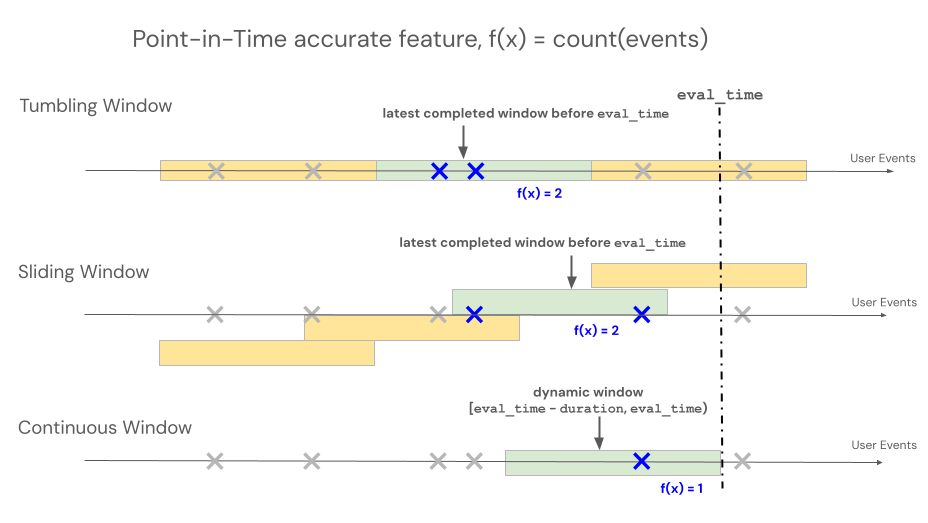
时间窗口时间
用来 delay 评估较早分析时间点的窗口。 例如,一个30天窗口但延迟7天,计算出评估前一周的30天值。
delay 与源到来时间无关。 要模拟源数据到达所需的时间,可以改为配置 SourceLateness.settling_delay 。
当两种环境同时存在时,他们就会作曲。 Azure Databricks 在源 settleling delay 后将窗口视为完整,并使用分析延迟进行评估。
用于 offset 更改固定窗口边界的对齐。 默认情况下,翻滚窗口和滑动窗口对齐于午夜UTC。 例如,22小时的偏移将每日边界对齐于协调世界时22:00。 要近似当地时区的边界,可以配置一个相对于UTC的静态偏移量。 偏移不调整夏令时、调整评估时间或建模晚到数据。
下表总结了对这些字段的支持情况:
| 领域 | 支持的窗口 | 约束 |
|---|---|---|
delay |
滚动、翻滚和滑行 | 必须是非负数 datetime.timedelta |
offset |
翻滚与滑行 | 必须非负且时间短于周期*。 |
SourceLateness.settling_delay |
滚动、翻滚和滑动特征 | 必须是非负数 datetime.timedelta |
start_time |
滚动、翻滚和滑行 | 一定是 datetime.datetime |
*周期:对于翻滚窗口,偏移量必须小于 window_duration。 对于滑动窗口,它必须比 短 slide_duration。
开始时间
用于 start_time 设置UTC中特征可以输出的最早事件时间边界。 边界是包容性的。
start_time 门输出。 它不限制窗口可读取的历史源行,也不改变窗口的对齐。 如果 start_time 位于两个对齐边界之间,第一个符合条件的固定窗口输出就是下一个边界。
在 start_time的情况下,固定时长窗口可以在源中完整窗口时长结束前发出。 这些早期输出使用可用的源历史。 例如,考虑一个滑动窗口,其 window_duration 数据从2024年1月1日开始,数据为一年, slide_duration为一天:
没有
start_time,该特征将在2025年1月1日首次发布,届时可以形成完整的一年窗口。start_time该专题定于2024年8月21日播出,首播日期为2024年8月21日。 该输出仅涵盖截至2024年1月1日的原始历史。 该窗口于2025年1月1日达到完整的一年期,并从此产生完整的输出。
由于 start_time 不改变窗口对齐,两个对齐边界之间的值不会生成新的边界。 对于带有每日边界的翻滚窗口,UTC午夜时,06:00 UTC的a start_time 会在下一个午夜边界首次发射。
start_time一个恰好落在边界上的粒子会在该边界发射,因为该边界是包容的。
如果 start_time 未被设置,滚动窗口和固定时长滑动窗口会在形成完整窗口后,先在对齐边界处发射。 终身滑动窗口和滚动窗口一旦有合格源数据就会发出。
注释
start_time 支持与滚动、翻滚或滑动窗口一起使用 DeltaTableSource 的批处理功能。 它不支持与或 StreamSourceSawtoothWindow。
例如:
from datetime import datetime, timedelta
from databricks.feature_engineering.entities import SlidingWindow

window = SlidingWindow(
    window_duration=timedelta(days=365),
    slide_duration=timedelta(days=1),
    start_time=datetime(2024, 8, 21),
)
滚动窗口
注释
RollingWindow 以前命名过 ContinuousWindow。 如果要从早期 SDK 版本迁移,请相应地更新导入。
滚动窗口 up-to-date 和实时聚合,通常用于流数据。 在流式处理管道中,滚动窗口仅在固定长度窗口的内容发生更改时(例如事件进入或离开时)发出新行。 在训练管道中使用滚动窗口功能时,将使用紧邻特定事件的时间戳之前的固定长度窗口持续时间对源数据执行准确的时间点特征计算。 这有助于防止联机与脱机数据不一致或数据泄露。 在时间 T 时,以 [T - 持续时间, T) 区间的聚合事件为特征。
class RollingWindow(TimeWindow):
    window_duration: datetime.timedelta
    delay: Optional[datetime.timedelta] = None
    start_time: Optional[datetime.datetime] = None
下表列出了滚动窗口的参数。 窗口开始和结束时间基于以下参数:
开始时间:
evaluation_time - window_duration - delay(含)结束时间:
evaluation_time - delay(独占)
| 参数 | 约束 |
|---|---|
delay(可选) |
一定是≥0。 将分析窗口从评估时间戳倒推。 用 SourceLateness.settling_delay 来建模流中源到达延迟的一致基线。 |
window_duration |
必须为 > 0 |
start_time(可选) |
特征可以输出的最早事件时间边界。 |
from databricks.feature_engineering.entities import RollingWindow
from datetime import timedelta

# Look back 7 days from evaluation time
window = RollingWindow(window_duration=timedelta(days=7))
使用以下代码定义延迟滚动窗口。
# Compute a 7-day value as of one day before the evaluation time
window = RollingWindow(
    window_duration=timedelta(days=7),
    delay=timedelta(days=1)
)
滚动窗口示例
window_duration=timedelta(days=7):这将创建一个以当前评估时间结束的 7 天回溯窗口。 对于第 7 天下午 2:00 的活动,这包括从第 0 天下午 2:00 到第 7 天下午 2:00 之前的所有活动。window_duration=timedelta(hours=1), delay=timedelta(minutes=30):这将在评估时间的30分钟前创建一个持续1小时的回溯窗口。 对于下午 3:00 的事件,这包括从下午 1:30 到(但不包括)下午 2:30 的所有事件。
用于 Last 绑定最新值的新鲜度
Last
RollingWindow结合当最新值仅在有限时间内有效时。 在评估时,特征返回该区间内时间戳最晚的行的值:
[evaluation_time - delay - window_duration, evaluation_time - delay)
如果区间中最新的行包含空值,特征返回空值。 如果你想排除空输入值,可以在源端设置 a filter_condition 。
该组合与 ColumnSelection不同。
ColumnSelection 返回最新观察到的非空值,且不会根据年龄过期。
对于批量特征,这种组合有一个特殊的在线化模式。 它只 DeltaTableSource支持、 Last、、 RollingWindow和 TableTrigger。 参见 Materialize新鲜度受限的最新数值。
滑动窗口
对于使用滚动窗口定义的特性,聚合是通过预先确定的固定长度窗口计算的,该窗口按滑动间隔推进,生成完全划分时间的非重叠窗口。 因此,源中的每个事件都只贡献一个窗口。 在时间 t 的功能会聚合从时间窗口结束于或早于(但不包括)t 的数据。 Windows 从 Unix 时代开始。
class TumblingWindow(TimeWindow):
    window_duration: datetime.timedelta
    delay: Optional[datetime.timedelta] = None
    offset: Optional[datetime.timedelta] = None
    start_time: Optional[datetime.datetime] = None
下表列出了翻转窗口的参数。
| 参数 | 约束 |
|---|---|
window_duration |
必须为 > 0 |
delay(可选) |
一定是≥0。 将分析窗口从评估时间戳倒推。 |
offset(可选) |
必须是≥0且小于 window_duration。 从UTC午夜开始调整窗口边界。 |
start_time(可选) |
特征可以输出的最早事件时间边界。 |
from databricks.feature_engineering.entities import TumblingWindow
from datetime import timedelta

window = TumblingWindow(
    window_duration=timedelta(days=1),
    delay=timedelta(hours=2),
    offset=timedelta(hours=22),
)
滚动窗口示例
-
window_duration=timedelta(days=5):这会创建预先确定的固定长度窗口,每个窗口为 5 天。 示例:窗口 #1 跨越第 0 天到第 4 天、窗口 #2 跨越第 5 天到第 9 天、窗口 #3 跨越第 10 天到第 14 天等。 具体而言,Window #1 包括所有在第 0 天从00:00:00.00开始且早于第 5 天00:00:00.00时间戳的事件(不包括第 5 天的事件)。 每个事件只属于一个窗口。
滑动窗口
对于使用滑动窗口定义的特征,聚合计算在一个按滑动间隔推进的窗口上。 滑动窗口可以是固定时长或终身时长。 固定时长窗口会重叠,因此每个源事件都可以为多个窗口的功能聚合做出贡献。 生命周期窗口包含窗口结束前的所有源事件。 在时间 t 的功能会聚合从时间窗口结束于或早于(但不包括)t 的数据。 Windows 与 Unix 时代保持一致。
class SlidingWindow(TimeWindow):
    window_duration: Optional[datetime.timedelta]
    slide_duration: datetime.timedelta
    delay: Optional[datetime.timedelta] = None
    offset: Optional[datetime.timedelta] = None
    start_time: Optional[datetime.datetime] = None
下表列出了滑动窗口的参数。
| 参数 | 约束 |
|---|---|
window_duration |
必须是固定期限窗口的阳性。 设置为 None 终身窗口。 |
slide_duration |
必须是正的。 对于固定时长的窗口,它也必须短于 window_duration。 |
delay(可选) |
一定是≥0。 将分析窗口从评估时间戳倒推。 |
offset(可选) |
必须是≥0且小于 slide_duration。 从UTC午夜开始调整窗口边界。 |
start_time(可选) |
特征可以输出的最早事件时间边界。 |
from databricks.feature_engineering.entities import SlidingWindow
from datetime import timedelta

window = SlidingWindow(
    window_duration=timedelta(days=7),
    slide_duration=timedelta(days=1),
    delay=timedelta(hours=2),
    offset=timedelta(hours=22),
)
滑动窗口示例
-
window_duration=timedelta(days=5), slide_duration=timedelta(days=1):这将创建重叠的 5 天窗口,每次向前推进 1 天。 示例:窗口 #1 跨越第 0 天到第 4 天,窗口 #2 跨越第 1 天到第 5 天,窗口 #3 跨越第 2 天到第 6 天,依依如此。 每个窗口包括从00:00:00.00开始日到(但不包括)结束日00:00:00.00的事件。 由于窗口重叠,单个事件可以属于多个窗口(在此示例中,每个事件最多属于 5 个不同的窗口)。
终身窗口
设置为 window_duration=None 创建一个终身窗口。 在每个幻灯片边界处,特征汇总该实体的所有源事件,时间戳早于该边界。 例如,一天的幻灯片每天产生一次累积值。
生命周期窗口仅支持。SlidingWindow
RollingWindow并且TumblingWindow需要一个有限的。window_duration
注释
Lifetime 窗口需要客户端版本 databricks-feature-engineering 支持 window_duration=None 并启用工作区。 早期客户端版本不支持这种语法。
from datetime import timedelta
from databricks.feature_engineering.entities import (
    AggregationFunction,
    DeltaTableSource,
    Feature,
    SlidingWindow,
    Sum,
)

lifetime_spend = Feature(
    source=DeltaTableSource(
        catalog_name="main",
        schema_name="store",
        table_name="transactions",
    ),
    entity=["user_id"],
    timeseries_column="transaction_time",
    function=AggregationFunction(
        Sum(input="amount"),
        SlidingWindow(
            window_duration=None,
            slide_duration=timedelta(days=1),
        ),
    ),
    name="lifetime_spend",
)
锯齿窗
锯齿窗口是一种汇总,支持近期事件的高度更新,并每日压缩历史数据。 其后缘(较旧)沿以固定的每日步进方式推进,而前沿(近期)沿则保持最新事件,因此有效窗口长度在每天内“锯切”。 大部分时间窗口来自流的摄取表中的数据,只有最近两天的数据来自直播流。 这是一种高效计算长期窗口(可扩展至数年)的折中方案,同时保持对新更新的响应。
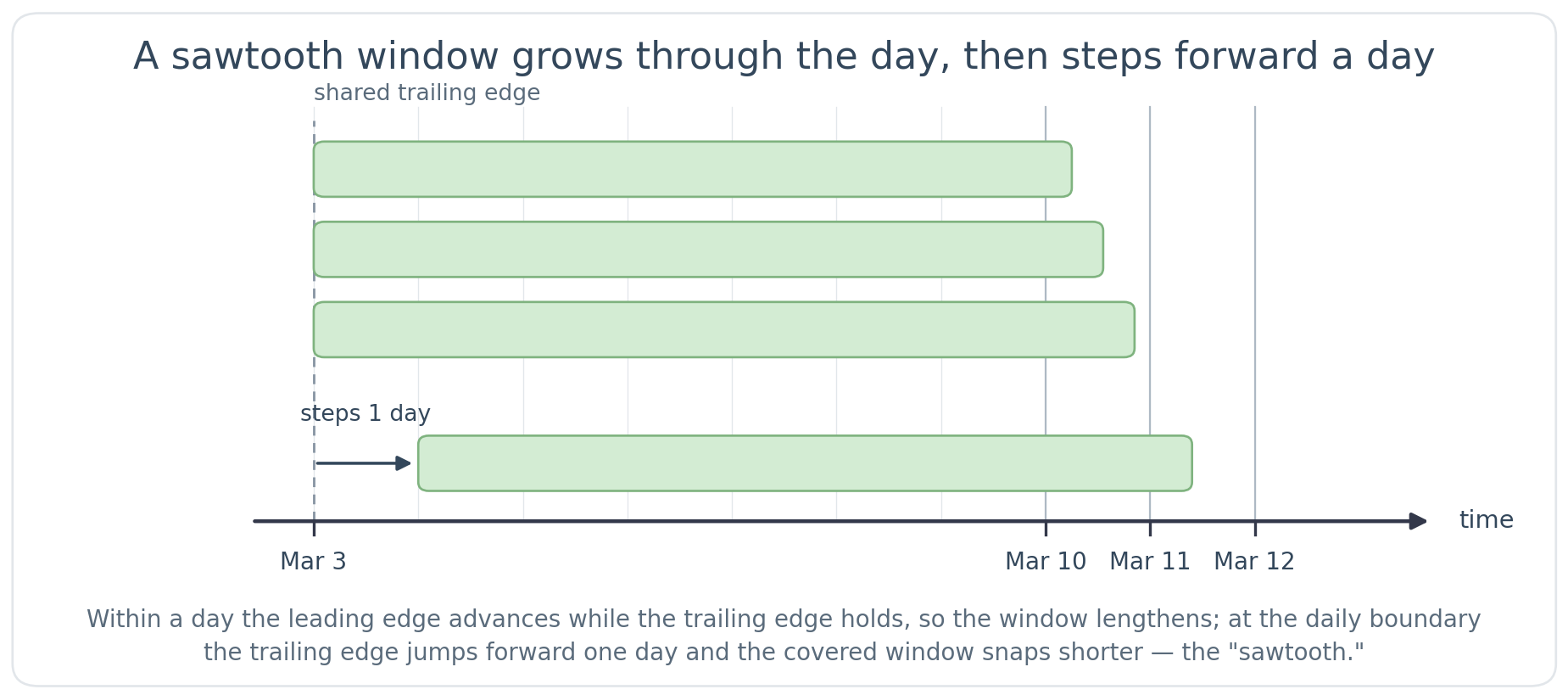
锯齿窗通过混合批次和流式路径实现。 批处理流水线维护窗口的大部分内容,而流式流水线则实时保持最新数据的新鲜性。 两者在读时合并,因此对模型或服务用户来说,这只是一个功能。
由于窗口的历史部分由批处理流程计算,锯齿形特征在物质化开始后不久即可投入使用,即使窗口跨越数月或数年。 滚动窗口只有在其完整窗口持续时间结束后才算完整。 最低 window_duration 限度必须超过两天(强制下限)。 Databricks建议在持续时间超过7天时使用锯齿形窗口。 对于超过两天甚至最多七天的窗户,可以在固定长度的 卷帘窗 和锯齿窗的快速生产准备之间选择。
注释
锯齿形特征依赖于已有的历史。 流的摄取表必须包含至少覆盖整个窗口时长的数据,否则计算出的窗口不完整。 不到两天,该特征仅反映迄今为止出现的数据。 建议在制作过程中持续2天后才提供该功能。 在空窗口上的聚合对 和 返回 0Sum,对于 Avg, Min, Last,StddevSampMaxFirstVarPopVarSampStddevPopCount
锯齿窗需要 和 StreamSource ,并以 StreamingMode实现。
class SawtoothWindow(TimeWindow):
    window_duration: datetime.timedelta
锯齿窗的边缘移动方式与滚动窗不同:前缘跟踪最新事件,而后缘每天前进一次,而非连续推进。 每天在固定的18:00 UTC截止点,后缘向前移动至当天UTC-午夜边界。 因此,有效窗口略长 window_duration ,并在一天中增长,然后在下一个截止日又会恢复。 培训和服务使用相同的18:00 UTC截止时间,因此离线培训和在线服务保持一致。
| 参数 | 约束 |
|---|---|
window_duration |
必须超过两天。 允许的持续时间不是整数天(例如), timedelta(days=3, minutes=15)但窗口仍会以每日细度更新。 |
锯齿窗支持Sum、Avg、MinFirstLastMaxCountVarSampStddevPopVarPopStddevSamp和聚合功能。
锯齿窗示例
以下示例展示了用户交易的7天计数。 前缘跟踪当前事件,后缘则一天一天地前进。 对于3月10日的活动,时间窗口可以追溯到大约3月3日。 随着3月10日的推进,前缘继续前进,而后端保持不动,因此覆盖跨度不断扩大。 然后,在3月11日初,尾缘逐渐过渡到大约3月4日。 有效窗口期总是略长于七天。 最近两天的日期由直播流提供,较早的天数则由直播的摄取表提供。
from databricks.feature_engineering.entities import SawtoothWindow
from datetime import timedelta

# 7-day window kept continuously fresh with streaming data
window = SawtoothWindow(window_duration=timedelta(days=7))
锯齿窗的限制
不支持此参数
delay。不支持
SourceLateness.settling_delay。除
Sum、Avg、MinStddevPopVarPopMaxVarSampFirstLastCount和StddevSamp之外,其他聚合函数不被支持(例如ApproxCountDistinct,FirstNLastNApproxPercentileFirstDistinct和)。LastDistinct锯齿窗需要一个
StreamSource.DeltaTableSourceA不支持。
具体化触发器
触发具体化管道运行时的控制。 触发器类型取决于功能类型。
CronSchedule
用于 CronSchedule 批处理聚合功能。 默认情况下,Azure Databricks 会从聚合窗口中派生一个排程。 派生计划考虑窗口期间、窗口 delay 和 offset,以及源 settling_delay 代码,确保运行在源数据预计完成前发布窗口。 派生时刻表支持翻滚和滑动窗口。
要请求派生调度,省略cron表达式。
CronSchedule() 和显式 CronSchedule(mode=CronScheduleMode.DERIVED) 形式是等价的:
from databricks.feature_engineering.entities import (
    CronSchedule,
    CronScheduleMode,
)

trigger = CronSchedule(mode=CronScheduleMode.DERIVED)
不要设置 quartz_cron_expression 。CronScheduleMode.DERIVED 当你检索到实体化的特性时,返回的计划可以包含 Azure Databricks 计算的 cron 表达式。
要直接控制时间表,提供Quartz cron表达式。
CronScheduleMode.MANUAL 当你给出表达式时,可以推断出:
from databricks.feature_engineering.entities import CronSchedule

trigger = CronSchedule(
    quartz_cron_expression="0 0 * * * ?",  # Hourly
    timezone_id="UTC",
)
TableTrigger
用于TableTriggerColumnSelection特征AggregationFunction或由DeltaTableSource . 每当上游 Delta 表收到新提交时,管道将运行。
对于聚合功能,流水线会限流,这样每次提交都不会运行。 该流水线最多每功能窗口长度的一半运行一次,但频率从不超过每5分钟一次。 例如,一个有1小时滚动窗口的电影最多每30分钟运行一次,或者一个有8小时窗口的电影最多每4小时播放一次。 当窗口的一半时间窗口小于5分钟时,5分钟的最低时间段适用,因此10分钟或更短的窗口最多每5分钟运行一次。 时间窗口不到5分钟的聚合功能不能使用 TableTrigger,建议使用流媒体触发器。
from databricks.feature_engineering.entities import TableTrigger

trigger = TableTrigger()
StreamingMode
用于 StreamingMode 支持的功能 StreamSource。 管道作为连续流式处理管道运行。
from databricks.feature_engineering import FeatureEngineeringClient
from databricks.feature_engineering.entities import (
    StreamSource, Feature, AggregationFunction, Sum,
    RollingWindow, OnlineStoreConfig, StreamingMode,
)
from datetime import timedelta

fe = FeatureEngineeringClient()

stream_source = StreamSource(full_name="my_catalog.my_schema.my_stream")

streaming_feature = fe.create_feature(
    source=stream_source,
    entity=["value.user_id"],
    timeseries_column="value.event_time",
    function=AggregationFunction(
        operator=Sum(input="value.amount"),
        time_window=RollingWindow(window_duration=timedelta(hours=1)),
    ),
    catalog_name="my_catalog",
    schema_name="my_schema",
    name="user_purchase_sum",
)

fe.materialize_features(
    features=[streaming_feature],
    online_config=OnlineStoreConfig(
        catalog_name="my_catalog",
        schema_name="my_schema",
        table_name_prefix="streaming_features_serving",
        online_store_name="feature_store_online",
    ),
    trigger=StreamingMode(),
)
选择触发器
每个功能使用一个触发器;按功能类型分类的选项如下:
| 功能类型 | Trigger | 运行时 |
|---|---|---|
聚合 (AggregationFunction) 来自 DeltaTableSource |
CronSchedule |
在衍生或手动时刻表上 |
聚合 (AggregationFunction) 来自 DeltaTableSource |
TableTrigger |
在每个源表提交时 |
ColumnSelection (发件人 DeltaTableSource) |
TableTrigger |
在每个源表提交时 |
功能 StreamSource |
StreamingMode |
连续流式处理 |
不能在单个 materialize_features 调用中具体化需要不同触发器类型的功能。 改为发出单独的调用,而不是合并调用。