Note
Access to this page requires authorization. You can try signing in or changing directories.
Access to this page requires authorization. You can try changing directories.
When you're ready to migrate BizTalk Server solutions to Azure Logic Apps Standard, modernize your enterprise integrations as Standard logic app solutions by using the Migration Agent extension for Visual Studio Code. The agent is an open-source extension that provides an AI-assisted workflow by using GitHub Copilot and the Visual Studio Code Language Model API to guide you from discovery through deployment.
Migration isn't a lift-and-shift process. Preserve the required business behavior, but refactor the implementation to use appropriate Azure Logic Apps workflows, connectors, custom code, identity, messaging, monitoring, and deployment practices. Start with Azure Logic Apps Standard as the target application, use the native workflow capabilities, built-in connectors, transformations, and local functions where appropriate, and add other Azure services only when a specific architectural requirement justifies them. For reasons to modernize and a capability summary, see Why migrate from BizTalk Server to Azure Logic Apps Standard?
Important
The Migration Agent accelerates analysis and generates baseline implementation artifacts, but doesn't replace architectural review or testing. Review the output at every stage and validate all generated workflows, connections, configuration, and code before deployment.
For an introduction and demonstration, see Modernize any integration platform to Azure Logic Apps Standard with the Azure Logic Apps Migration Agent. To inspect the implementation, report issues, or contribute, see the Logic Apps Migration Agent repository.
Supported migration scope
The following table describes the BizTalk Server source and Azure Logic Apps target support in Azure Logic Apps Migration Agent version 1.12.1. Check the Migration Agent releases for changes before you start a migration.
| Scope | Version 1.12.1 support |
|---|---|
| BizTalk Server source | BizTalk Server 2016 and 2020. Built-in parsers support project (.btproj), orchestration (.odx), map (.btm), schema (.xsd), pipeline (.btp), binding (BindingInfo.xml, Binding*.xml, or binding XML recognized by name or content), host data layout (.hidx), business rules (.bre, .brl), and web service (.asmx) files. |
| Conversion target | Azure Logic Apps Standard project artifacts, including workflows, connections, configuration, and supporting code. You can adapt and deploy the generated project to a supported Standard hosting option. |
| Automated deployment target | Workflow Service Plan. Migration Agent version 1.12.1 doesn't automate deployment to App Service Environment v3 hosting. Implement deployment to those hosting options separately by using the generated Standard project and the respective product guidance. |
Parser support means that the extension can discover and represent the listed source artifacts. Missing dependencies, unsupported constructs, and application-specific code still require investigation and might require manual implementation. Generated analysis, plans, workflows, connections, configuration, and code require review and validation.
The Migration Agent architecture is extensible to other integration platforms through contributed parsers and platform-specific skills, but the extension doesn't provide complete migration support for every platform by default. For current platform status and extensibility guidance, see Azure Logic Apps Migration Agent overview and Extend Azure Logic Apps Migration Agent to other platforms.
How the Migration Agent works
The extension organizes migration into five stages. Complete and review each applicable stage before proceeding to the next one. Deployment is optional and requires separate approval.
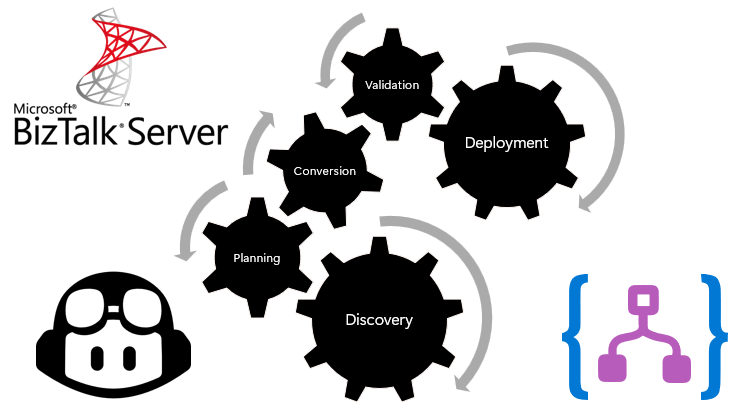
| Stage | Agent outcome | Your responsibility |
|---|---|---|
| Discovery | Scans source artifacts, builds an inventory and dependency graph, organizes flow groups, identifies patterns and gaps, and produces architecture and message-flow views. | Confirm that artifacts, endpoints, dependencies, and flow boundaries are complete and accurate. |
| Planning | Maps source components to Azure Logic Apps patterns and generates target architecture, workflow definitions, Azure component requirements, action mappings, artifact dispositions, gap analysis, and integration patterns. | Select the target architecture, resolve gaps, adjust boundaries, define the hosting and cost assumptions, and approve the plan. |
| Conversion | Generates Standard workflows, connections, supporting project files, and .NET local functions when required by the approved plan. | Inspect generated definitions and code, replace invalid configuration, and implement unresolved behavior. |
| Validation | Runs generated workflows and helps compare their behavior with source specifications and tests. | Provide representative inputs and expected outputs, test edge cases, and verify semantic equivalence. |
| Deployment (optional) | After separate approval, prepares Azure resources and deploys the reviewed Azure Logic Apps Standard project to Workflow Service Plan. | Approve the environment, identity, network, configuration, security, cost, and production release plan. |
Custom code in a BizTalk solution doesn't automatically require a separate Azure Functions resource. The Conversion stage can generate .NET local functions for workflow-scoped logic so that workflows and code build, deploy, scale, and operate together in the same Azure Logic Apps Standard application. Use a separate Azure Functions resource when code must be shared across applications or requires independent scaling, versioning, deployment, security, or ownership. For more information, see the custom code guidance for BizTalk migration.
Three specialized Copilot agents support the workflow:
@migration-analysergroups and analyzes discovered artifacts.@migration-plannercreates migration plans and source-to-target mappings.@migration-convertergenerates workflows, connections, and supporting code from approved plans.
The extension stores stage outputs so you can inspect and correct the generated inventory, architecture, plans, and implementation artifacts. Treat these checkpoints as required engineering reviews rather than automatic approvals.
The BizTalk capability mapping provides a high-level view of common modernization paths. During Planning, the Migration Agent produces operation-level mappings for each flow, identifies components without direct equivalents, and recommends resolutions.
Prepare your migration
Before you start Discovery, collect the source implementation and the evidence needed to verify its behavior:
- BizTalk solution and project files
- Bindings and environment-specific configuration
- Orchestrations, schemas, maps, pipelines, and pipeline components
- Business rules, assemblies, and other custom code
- HIDX files
- Endpoint and adapter information
- Certificates or certificate references without exposing private keys or secrets
- Existing architecture and operational documentation
- Representative input messages and expected outputs
- Unit, integration, regression, and black-box tests
- Throughput, latency, ordering, message-size, recovery, and availability requirements
Keep related files and dependencies in a clear directory structure. Discovery quality depends on the completeness of the source material. Resolve missing dependencies and incorrect flow groupings before authorizing Planning or Conversion.
Modernize incrementally
For most BizTalk estates, migrate in waves rather than using a single big-bang release. Use the Discovery results to group related artifacts into end-to-end integration flows, then prioritize flows based on business value, risk, complexity, expected operating cost, support timelines, and dependencies.
For each wave:
- Select one or more representative flow groups.
- Complete and review the applicable Migration Agent stages. Run the optional Deployment stage only when you want the agent to deploy to Workflow Service Plan.
- Validate behavior and nonfunctional requirements in a representative environment.
- Plan coexistence, partner coordination, cutover, rollback, and backlog reconciliation.
- Release the migrated flows and confirm production monitoring and support ownership.
- Capture reusable mappings, architecture patterns, tests, deployment assets, and lessons for later waves.
Start with a flow that is meaningful enough to validate the target architecture but contained enough to expose gaps without putting a critical migration path at unnecessary risk.
Estimate each wave by starting with the Azure Logic Apps Standard application and adding supporting Azure services only when the approved architecture requires them. Each service is provisioned and billed independently. Include Standard hosting, managed connector calls, storage, networking, monitoring, supporting services, and temporary BizTalk coexistence in the estimate. For more information, see Build a cost-effective target architecture.
What your team still owns
The Migration Agent automates repeatable work. Your team remains responsible for the decisions and evidence required for a production integration solution.
| Responsibility | Required review |
|---|---|
| Target architecture | Start with the Azure Logic Apps Standard application boundary. Define workflow, messaging, networking, and deployment boundaries. Add supporting Azure services only when requirements justify them instead of copying the BizTalk topology. |
| Semantic equivalence | Verify contracts, mappings, rules, routing, ordering, retries, error behavior, and edge cases. |
| Capability gaps | Prefer native workflow capabilities and .NET local functions for workflow-scoped logic. Use messaging, API Management, a separate Azure Functions resource, or another external service when the solution requires an independent boundary. |
| Security and configuration | Implement identity, authorization, secret management, certificates, network controls, and environment-specific settings. |
| Production hardening | Complete performance, scale, resiliency, disaster recovery, cost, monitoring, and operational-readiness testing. |
| Cutover and coexistence | Coordinate partners and dependent systems, reconcile in-flight work, define rollback, and decommission BizTalk components only after validation. |
Apply mission-critical design guidance only to workloads whose business impact and availability requirements warrant that classification.
Next step
Install the extension, prepare a complete source folder, and begin with Discovery. Keep source projects unchanged and write generated output to a separate destination so you can compare implementations and repeat the migration safely.