Note
Access to this page requires authorization. You can try signing in or changing directories.
Access to this page requires authorization. You can try changing directories.
Azure Service Health notifications are system-generated alerts that inform you about Azure service problems or events that affect your resources. The subscription's Azure activity log records these notifications as part of logging many events in Azure. The Azure portal then displays them under Azure Service Health.
When Azure needs to communicate something about service health, such as an outage, upcoming maintenance, or an account-specific alert, it creates a Service Health event in your activity log.
Depending on the notification type, it can be purely informational or indicate a problem that requires your action.
For information on how long Service Health notifications stay active in the portal, see Service Health data transitions.
View Service Health notifications
After you sign in to Azure, access Service Health notifications in one of three ways:
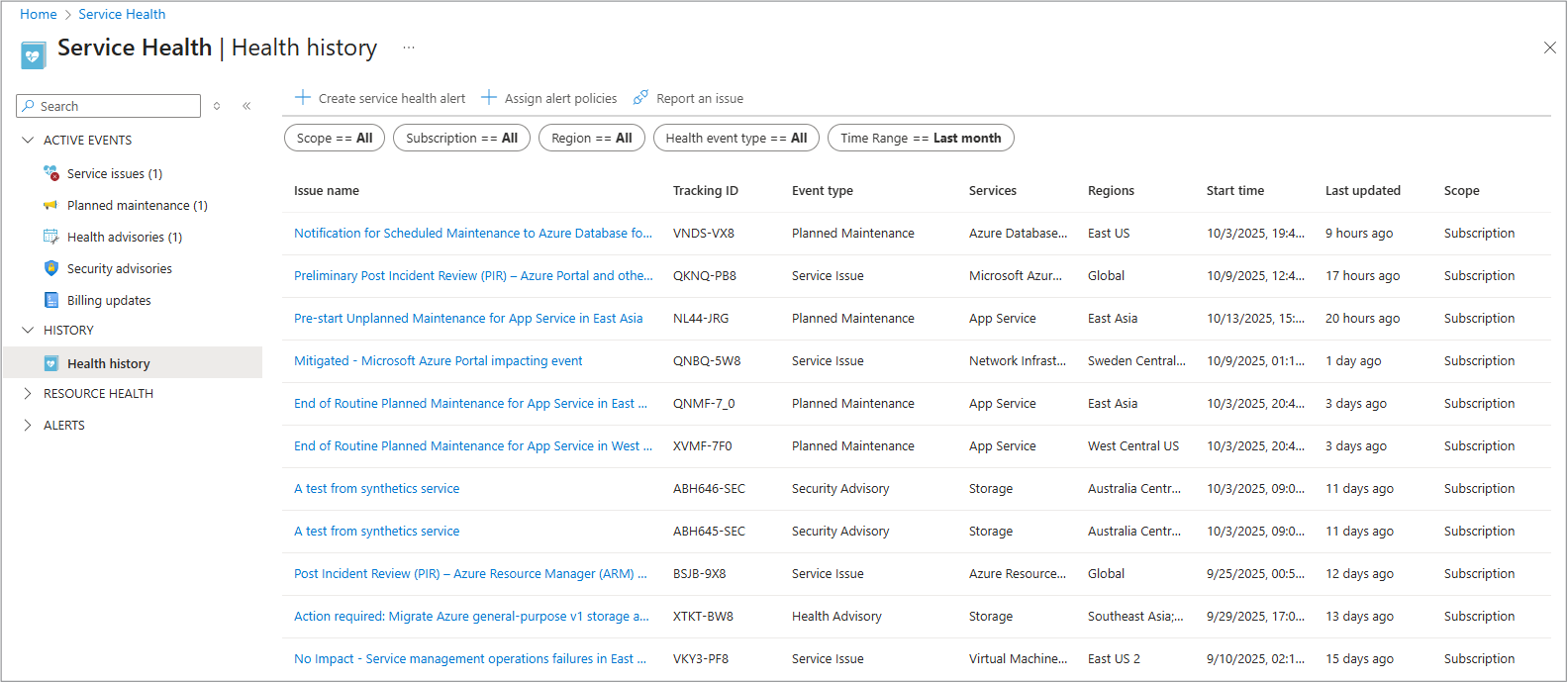
Azure portal via Service Health: In the Azure portal, select Service Health to open a personalized dashboard that shows any active notifications for your subscriptions. The dashboard organizes the notifications into categories that correspond to the types of notifications, such as incidents and maintenance.
A Health history section shows information about past events. For example, active service outages are listed under Incidents, and planned maintenance is listed under Maintenance. From this interface, you can select a notification to read its details, including impact, status updates, and resolution.
For more information, see Azure Service Health portal.
Azure portal via the activity log: In the Azure portal, open the activity log to view notifications that contain more detailed information, but only under specific conditions:
- Service Health events appear in the activity log when they're subscription scoped, such as service problems, planned maintenance, and health advisories.
- Emerging issues don't appear when they're global and not tied to a subscription.
For more information, see View and retrieve the activity log.
Alerts: Within the Service Health portal pane, you can also set up activity log alerts to notify you when new Service Health events occur. Messages are delivered via email, Short Message Service (SMS), or other actions. For instance, you might create an alert to get an email whenever there's a new incident or a security advisory. In this way, you don't have to constantly check the portal because Azure proactively sends you a notification through the channel that you selected.
For more information on how to create alerts, see Create Service Health alerts.
Because the Service Health notifications are from activity log events, you can retrieve them by using Azure APIs or command-line tools. Azure Resource Graph queries also list Service Health events across resources. This programmatic access is helpful for integration with external systems or dashboards.
For information about using Azure Resource Graph queries to create reports on your Service Health notifications, see Resource Graph sample queries. This document provides guidance on how to use the available queries.
Service Health notification types
To help you stay ahead of potential disruptions, Azure categorizes Service Health events into six types. Each one indicates a different type of situation. Some event types are actionable (meaning that you need to do something) and others are purely informational.
Here's a breakdown of each notification type, what it means, and how you can access and retain these updates:
Action required: Actionable
Azure detected something unusual or important in your subscription that needs your attention or intervention. For example, Azure might detect something that needs your attention, like a configuration problem or an upcoming change that could affect your service. When that happens, Azure sends you a notification that explains what's happening. Azure provides clear steps that you can take to fix it or how to reach support for help. The notifications are proactively issued to prevent or fix potential problems.
The notifications often appear in the Service Health portal under Health advisories.
Incident: Informational (urgent service issue)
This notification type represents a service outage or degradation (an unplanned event) that currently affects one or more of your Azure resources. Essentially, an Incident notification means that Azure is experiencing a problem (for example, a datacenter issue) that affects you. The notification describes the issue and keeps you updated on its status. Although Incident notifications are labeled informational, they're critical to know about. You usually don't fix them, but you might activate your contingency plans.
You typically see these notifications in the Service issues pane for active outages.
Maintenance: Informational (scheduled event)
This notification type is for planned maintenance activities that might affect your resources. Azure uses these notifications to inform you of upcoming maintenance windows, such as infrastructure upgrades or patches that could cause a brief downtime or performance impact. The notification includes the schedule and scope of the maintenance so that you can prepare.
Maintenance notifications appear in the Planned maintenance pane in the portal.
Information: Informational (advisory)
These notifications are health advisories or suggestions that don't require action but provide useful information to optimize or improve your use of Azure. For example, Azure might send an informational notice about best practices or a notice about a nonurgent issue. In general, an Information type notification highlights potential optimizations or minor issues that don't directly affect service availability.
These notifications also appear in the Health advisories pane.
Security: Actionable or informational (security related)
Security notifications warn you of urgent security issues or advisories related to your Azure resources or Azure services. For instance, if a security vulnerability affects an Azure service that you use or a configuration that exposes a security risk, Azure issues a Security advisory. Some security notifications might require you to act (for example, apply a patch or update your settings). Other notifications might inform you of a potential threat or fix.
These notifications are found in the Security advisories pane in the portal.
Billing: Informational (account notices)
These notifications provide information about billing or subscription changes. They might notify subscription owners or contributors about things like upcoming billing updates, credit expiration, or other billing-related issues. Billing notifications are purely informational. You don't fix anything in Azure. If there’s a billing issue, contact support or check your billing settings.
These notifications are shown in the Billing updates pane.
Note
Billing notifications aren't shown in the activity log located in the Azure portal. You see them only in Azure Service Health.