Databricks 建议将 MLflow 跟踪存储在 Unity 目录表中,以用于新工作负载和生产工作负荷。 追踪以 OpenTelemetry(OTel)格式存储,并绑定到 MLflow 实验;该实验仍然是在 UI 中查看这些追踪的入口。 在 Unity 目录中存储跟踪具有以下优势:
在 Delta 表中存储大量追踪数据,以用于长期保留和分析,且每个实验的追踪数量不受限制。
访问控制通过 Unity 目录架构和表权限进行管理,而不是试验级 ACL。 有权访问 Unity 目录表的用户可以查看存储在这些表中的所有跟踪,而不管跟踪属于哪个试验。
跟踪存储为 SQL 原生 Delta 表,因此它们可接入整个 Lakehouse:通过 Databricks SQL 仓库使用 SQL 对其进行查询、生成 AI/BI 仪表板、驱动警报和 Lakeflow 管道,并使用 Spark 和 Lakehouse 生态系统的其余部分来处理它们,而不仅仅是运行即席分析和报告。
OTel 格式可确保与其他 OpenTelemetry 客户端和工具兼容。
下表比较了 Unity Catalog 存储与实验存储:
| Capability | 存储于 Unity Catalog 中的追踪 | 存储在试验中的跟踪 |
|---|---|---|
| 存储限制 | 无限制 | 每次实验 100,000 条追踪 |
| 查询选项 | MLflow UI 和Python SDK,以及 SQL、AI/BI 仪表板和任何基于 Spark 的工具 | MLflow UI 和 Python SDK |
| Governance | Unity 目录架构和表权限 | 试验级访问控制 |
| OpenTelemetry 兼容性 | 以 OTel 格式存储的追踪数据,与其他 OTel 客户端和工具兼容 | 不支持 |
Requirements
启用 Unity Catalog 的工作区。
支持区域中的工作区。 请参阅区域可用性受限的功能。
在环境中安装 MLflow Python库版本 3.14 或更高版本:
pip install mlflow[databricks]>=3.14.0 --upgrade --force-reinstall如果你在运行中的笔记本中安装或升级MLflow,断开并重新连接笔记本,这样就能重新启动Python进程,这样升级后的软件包才能加载。 如果跳过这个,之前加载的包会留在内存中,下一节的设置代码可能会因导入错误而失败,比如
cannot import name 'Sentinel' from 'typing_extensions'。在 Unity Catalog 中创建用于存储追踪数据的目录和架构的权限。
注释
对于 Unity Catalog 的跟踪表而言,ALL_PRIVILEGES 并不足够。 明确授予MODIFY和SELECT。
设置:使用 Unity Catalog 追踪位置创建试验
存储痕迹的目录和模式必须在你创建实验之前就存在。 将实验绑定到Unity Catalog的追踪位置并不会创建实验。 如果该模式还不存在,先创建它。 你需要在目录上使用 USE CATALOG,并在其上使用 CREATE SCHEMA。
CREATE SCHEMA IF NOT EXISTS <catalog_name>.<schema_name>;
然后运行以下代码,创建并绑定实验到Unity Catalog的跟踪位置:
# Example values for the placeholders below:
# MLFLOW_TRACING_SQL_WAREHOUSE_ID: "abc123def456" (found in SQL warehouse URL)
# experiment_name: "/Users/user@company.com/traces"
# catalog_name: "main" or "my_catalog"
# schema_name: "mlflow_traces" or "production_traces"
# table_prefix: "my_otel"

import os
import mlflow
from mlflow.entities.trace_location import UnityCatalog

mlflow.set_tracking_uri("databricks")

# Specify the ID of a SQL warehouse you have access to.
os.environ["MLFLOW_TRACING_SQL_WAREHOUSE_ID"] = "<SQL_WAREHOUSE_ID>"
# Specify the name of the MLflow Experiment to use for viewing traces in the UI.
experiment_name = "<MLFLOW_EXPERIMENT_NAME>"
# Specify the name of the Catalog to use for storing traces.
catalog_name = "<UC_CATALOG_NAME>"
# Specify the name of the Schema to use for storing traces.
schema_name = "<UC_SCHEMA_NAME>"
# Specify the name of the prefix appended to every table storing trace data.
table_prefix = "<UC_TABLE_PREFIX>"

# mlflow.set_experiment is an upsert operation
experiment = mlflow.set_experiment(
    experiment_name=experiment_name,
    trace_location=UnityCatalog(
        catalog_name=catalog_name,
        schema_name=schema_name,
        table_prefix=table_prefix,  # defaults to experiment id if not provided
    ),
)

print(f"Experiment ID: {experiment.experiment_id}")
print(experiment.trace_location.full_otel_spans_table_name)
可以使用 mlflow.create_experiment 与相同的 trace_location 参数起。 与set_experiment不同,create_experiment并不设置活动实验,因此之后必须调用set_experiment,以确保追踪被正确地路由到指定位置。
experiment_id = mlflow.create_experiment(
    name=experiment_name,
    trace_location=UnityCatalog(
        catalog_name=catalog_name,
        schema_name=schema_name,
        table_prefix=table_prefix,
    ),
)

# trace_location is optional here since
# the experiment is already bound to the UC trace location above.
experiment = mlflow.set_experiment(experiment_id=experiment_id)

print(f"Experiment ID: {experiment.experiment_id}")
print(experiment.trace_location.full_otel_spans_table_name)
Warning
如果你用 create_experimenttrace_location调用 时该模式不存在,MLflow 会创建实验,但跟踪位置链路失败,调用时会报错。 该实验被遗留下来,且没有与之绑定的跟踪位置。 先创建模式(见上面步骤),然后删除剩余的实验,再次调用 create_experiment 。
set_experiment 是一次 upsert 操作,因此一旦架构已存在,你就可以针对同一个实验名称再次运行它,而无需清理。
将试验绑定到 UC 跟踪位置后,无法将试验重新分配给其他 UC 跟踪位置。 但是,多个试验可以共享相同的 UC 跟踪位置。
校验表格
运行安装代码后,目录资源管理器 UI 中的架构中会显示四个新的 Unity 目录表:
<table_prefix>_otel_annotations<table_prefix>_otel_logs<table_prefix>_otel_metrics<table_prefix>_otel_spans
授予权限
Databricks 用户或服务主体需要以下 Unity 目录权限 才能从 Unity 目录表写入或读取 MLflow 跟踪:
在目录上执行USE_CATALOG。
USE_SCHEMA 在架构上。
在每个表上MODIFY和
<table_prefix>_<type>。
注释
ALL_PRIVILEGES 不足以访问 Unity Catalog 跟踪日志表。 必须显式授予 MODIFY 和 SELECT。
将日志跟踪记录到 Unity Catalog 表中
创建表后,可以通过指定跟踪位置,从各种源向其写入跟踪。 这取决于跟踪记录的来源来决定你如何进行。
MLflow SDK
可以使用 mlflow.set_experiment Python API 指定 Unity 目录跟踪位置。
import mlflow

from mlflow.entities.trace_location import UnityCatalog

mlflow.set_tracking_uri("databricks")

# Specify the catalog, schema, and table prefix to use for storing Traces
catalog_name = "<UC_CATALOG_NAME>"
schema_name = "<UC_SCHEMA_NAME>"
table_prefix = "<UC_TABLE_PREFIX>"

# For existing experiments, it is not necessary to specify `trace_location`. MLflow
# retrieves the UC trace location bound to the experiment and routes traces to
# that location.
mlflow.set_experiment(
    experiment_name="...",
    trace_location=UnityCatalog(
        catalog_name=catalog_name,
        schema_name=schema_name,
        table_prefix=table_prefix,
    ),  # optional for existing experiments
)

# Create and ingest an example trace using the `@mlflow.trace` decorator
@mlflow.trace
def test(x):
    return x + 1

test(100)
模型服务终结点
若要将跟踪从 Azure Databricks 模型服务终结点写入 Unity 目录表,终结点必须使用 OAuth 作为服务主体进行身份验证,或者作为具有个人访问令牌(PAT)的用户或服务主体进行身份验证。 Databricks推荐OAuth。
授予服务主体或用户 授予权限 中列出的 Unity Catalog 权限。
将凭据存储为 Databricks 机密,并将其作为基于机密的环境变量传递给终结点。 对于 OAuth,设置
DATABRICKS_CLIENT_ID和DATABRICKS_CLIENT_SECRET。 对于 PAT,设置DATABRICKS_TOKEN。你可以使用Azure Databricks托管服务主体或Microsoft Entra ID托管服务主体。 对于任意类型的 OAuth,将
DATABRICKS_CLIENT_ID设置为服务主体的应用程序(客户端)ID,将DATABRICKS_CLIENT_SECRET设置为该服务主体的 Databricks OAuth 密钥。 请参阅 Databricks 和 Microsoft Entra ID 服务主体。从 Databricks 笔记本(而不是从服务终结点内部)使用
mlflow.set_experimentPython API 创建 UC 跟踪位置的试验:import mlflow from mlflow.entities.trace_location import UnityCatalog mlflow.set_tracking_uri("databricks") # Specify the catalog, schema, and table prefix to use for storing Traces catalog_name = "<UC_CATALOG_NAME>" schema_name = "<UC_SCHEMA_NAME>" table_prefix = "<UC_TABLE_PREFIX>" # For existing experiments, it is not necessary to specify `trace_location`. MLflow # retrieves the UC trace location bound to the experiment and routes traces to # that location. mlflow.set_experiment( experiment_name="...", trace_location=UnityCatalog( catalog_name=catalog_name, schema_name=schema_name, table_prefix=table_prefix, ), # optional for existing experiments )将实验 ID 添加到 Databricks 模型服务终结点的环境变量配置中,并将
MLFLOW_EXPERIMENT_ID用作环境变量名称。
第三方 OTel 客户端
以 OTel 格式存储跟踪的一个好处是,可以使用支持 OTel 的第三方客户端写入 Unity 目录表。 以这种方式记录的轨迹只要具有根跨度,就会显示在链接到表的 MLflow 实验中。 以下示例演示 OpenTelemetry OTLP 导出程序。
from opentelemetry.exporter.otlp.proto.http.trace_exporter import OTLPSpanExporter

# Span exporter configuration
otlp_trace_exporter = OTLPSpanExporter(
    # Databricks hosted OTLP traces collector endpoint
    endpoint="https://myworkspace.databricks.com/api/2.0/otel/v1/traces",
    headers={
        "content-type": "application/x-protobuf",
        "X-Databricks-UC-Table-Name": "<catalog>.<schema>.<table_prefix>_otel_spans",
        "Authorization": "Bearer MY_API_TOKEN"
    },
)
请参阅将 Langfuse 跟踪导出到 Azure Databricks。
在 UI 中查看跟踪
查看以 OTel 格式存储的跟踪,方式与查看其他跟踪的方式相同:
在您的工作区中,转到 “试验”。
查找记录追踪数据的实验。 例如,由
mlflow.set_experiment("/Shared/my-genai-app-traces")设定的试验。单击“ 跟踪 ”选项卡可查看记录到该试验的所有跟踪的列表。
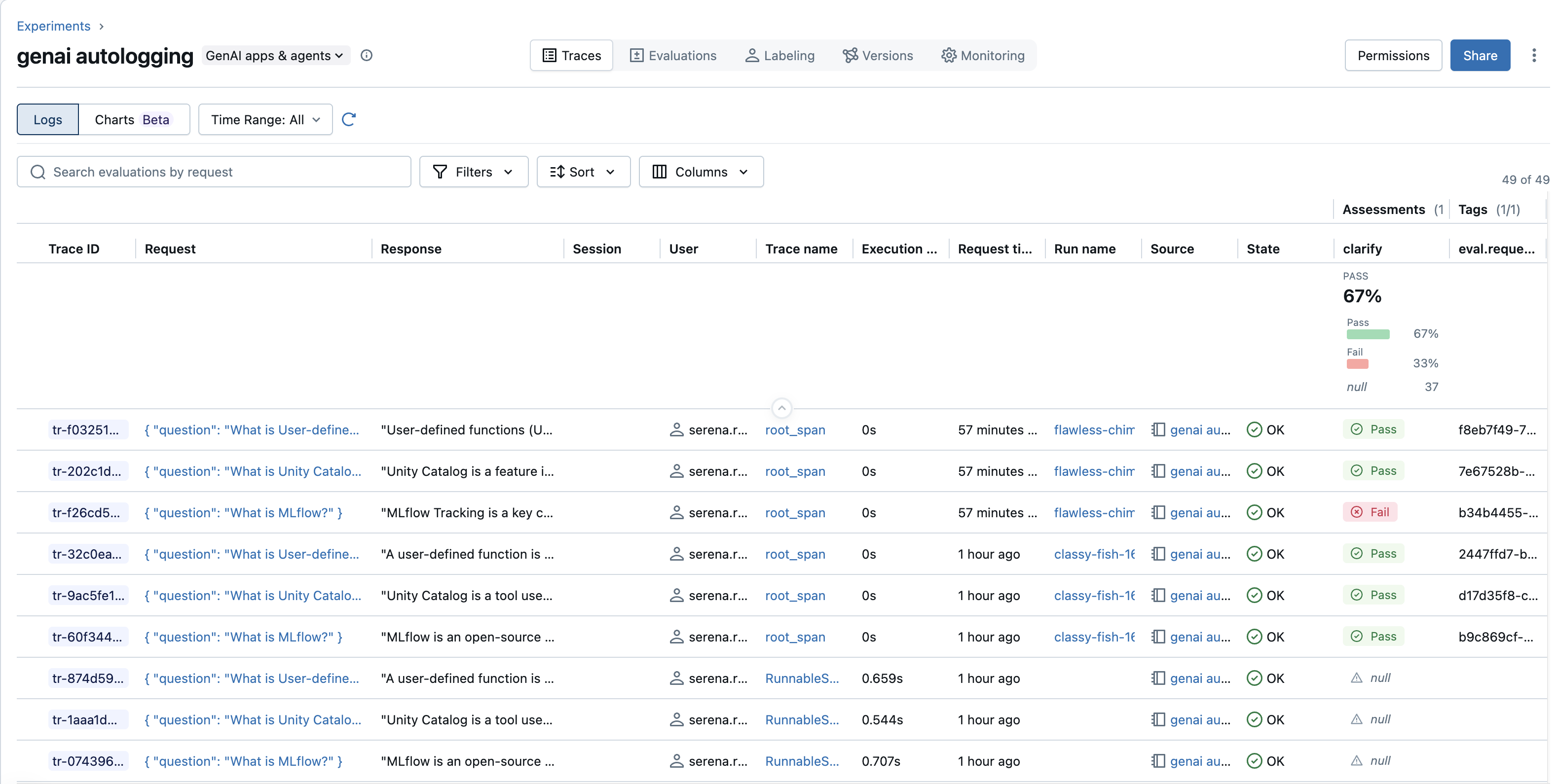
如果你在Unity Catalog 表中存储了跟踪数据,Azure Databricks 将使用 SQL 仓库 来检索这些跟踪记录。 从下拉菜单中选择 SQL 仓库。
有关使用 UI 搜索跟踪的详细信息,请参阅 Databricks MLflow UI 中的查看跟踪。
实验存储(回退)
Unity Catalog 是推荐的存储。 当没有配置 Unity Catalog 的跟踪位置时,MLflow 会退回到实验的托管后端。 该后端限制每个实验存储量为10万条跟踪,且可能不兼容最新的MLflow功能。 无论后端如何,追踪总是属于MLflow实验,MLflow实验是查看追踪的界面入口点。
Limitations
跟踪引入最初限制为每个工作区每秒 200 个跟踪,每个表每秒 100 MB。 如果需要更高的限制,请联系 Databricks 帐户团队。
只有在实验创建时,才能将实验绑定到 Unity Catalog 跟踪位置。
Unity Catalog 中存储的跟踪不支持删除单个条目。 若要删除跟踪,必须使用 SQL 直接从基础 Unity 目录表中删除行。 这不同于可以使用 MLflow UI 或 API 删除的试验跟踪。
跟踪尚不能写入默认存储编录。
目前无法将跟踪数据写入受 专用链接 保护的存储。
在服务终结点上启用跟踪可以减少服务吞吐量。
大于 25 MB 的 trace 无法从 MLflow UI 或 MLflow Python SDK 访问。 要访问这些跟踪,直接用SQL查询底层的Unity Catalog表。