Note
Access to this page requires authorization. You can try signing in or changing directories.
Access to this page requires authorization. You can try changing directories.
APPLIES TO: All API Management tiers
When you create an Azure API Management service instance in the Azure cloud, Azure assigns it a azure-api.cn subdomain (for example, apim-service-name.azure-api.cn). You can also expose your API Management endpoints using your own custom domain name, such as contoso.com. This article shows you how to map an existing custom DNS name to endpoints exposed by an API Management instance.
Important
API Management only accepts requests with host header values matching:
- The Gateway's default domain name
- Any of the Gateway's configured custom domain names
Note
Currently, custom domain names aren't supported in a workspace gateway.
Important
Changes to your API Management service's infrastructure (such as configuring custom domains, adding CA certificates, scaling, virtual network configuration, availability zone changes, and region additions) can take 15 minutes or longer to complete, depending on the service tier and the size of the deployment. Expect longer times for an instance with a greater number of scale units or multi-region configuration (gateways in multiple locations). Rolling changes to API Management are executed carefully to preserve capacity and availability.
While the service is updating, other service infrastructure changes can't be made. However, you can configure APIs, products, policies, and user settings. The service will not experience gateway downtime, and API Management will continue to service API requests without interruption (except in the Developer tier).
Prerequisites
An API Management instance. For more information, see Create an Azure API Management instance.
A custom domain name that is owned by you or your organization. This article does not provide instructions on how to procure a custom domain name.
Optionally, a valid certificate with a public and private key (.PFX). The subject or subject alternative name (SAN) has to match the domain name (this enables API Management instance to securely expose URLs over TLS).
DNS records hosted on a DNS server to map the custom domain name to the default domain name of your API Management instance. This topic does not provide instructions on how to host the DNS records.
For more information about required records, see DNS configuration, later in this article.
Endpoints for custom domains
There are several API Management endpoints to which you can assign a custom domain name. Currently, the following endpoints are available:
| Endpoint | Default |
|---|---|
| Gateway | Default is: <apim-service-name>.azure-api.cn. Gateway is the only endpoint available for configuration in the Consumption tier.The default Gateway endpoint configuration remains available after a custom Gateway domain is added. |
| Developer portal (all tiers except Consumption) | Default is: <apim-service-name>.developer.azure-api.cn |
| Management (classic tiers only) | Default is: <apim-service-name>.management.azure-api.cn |
| Self-hosted gateway configuration API (v2) | Default is: <apim-service-name>.configuration.azure-api.cn |
| SCM (classic tiers only) | Default is: <apim-service-name>.scm.azure-api.cn |
Considerations
- You can update any of the endpoints supported in your service tier. Typically, customers update Gateway (this URL is used to call the APIs exposed through API Management) and Developer portal (the developer portal URL).
- The default Gateway endpoint remains available after you configure a custom Gateway domain name and cannot be deleted. For other API Management endpoints (such as Developer portal) that you configure with a custom domain name, the default endpoint is no longer available.
- Only owners of API Management instances in the classic tiers can use Management and SCM endpoints internally. These endpoints are less frequently assigned a custom domain name.
- The Premium and Developer tiers support setting multiple custom hostnames for the Gateway endpoint.
- Wildcard domain names, like
*.contoso.com, are supported in the following tiers: Developer, Basic, Standard, Premium. A specific subdomain certificate (for example, api.contoso.com) would take precedence over a wildcard certificate (*.contoso.com) for requests to api.contoso.com. - When configuring a custom domain for the Developer portal, you can enable CORS for the new domain name. This is needed for developer portal visitors to use the interactive console in the API reference pages.
Domain certificate options
API Management supports custom TLS certificates or certificates imported from Azure Key Vault. You can also enable a free, managed certificate.
Warning
If you require certificate pinning, please use a custom domain name and either a custom or Key Vault certificate, not the default certificate or the free, managed certificate. We don't recommend taking a hard dependency on a certificate that you don't manage.
If you already have a private certificate from a third-party provider, you can upload it to your API Management instance. It must meet the following requirements. (If you enable the free certificate managed by API Management, it already meets these requirements.)
- Exported as a PFX file, encrypted using triple DES, and optionally password protected.
- Contains private key at least 2048 bits long
- Contains all intermediate certificates and the root certificate in the certificate chain.
Set a custom domain name - portal
Choose the steps according to the domain certificate you want to use.
- Navigate to your API Management instance in the Azure portal.
- In the left navigation, select Custom domains.
- Select +Add, or select an existing endpoint that you want to update.
- In the window on the right, select the Type of endpoint for the custom domain.
- In the Hostname field, specify the name you want to use. For example,
api.contoso.com. - Under Certificate, select Custom
- Select Certificate file to select and upload a certificate.
- Upload a valid .PFX file and provide its Password, if the certificate is protected with a password.
- When configuring a Gateway endpoint, select or deselect other options as necessary, including Negotiate client certificate or Default SSL binding.
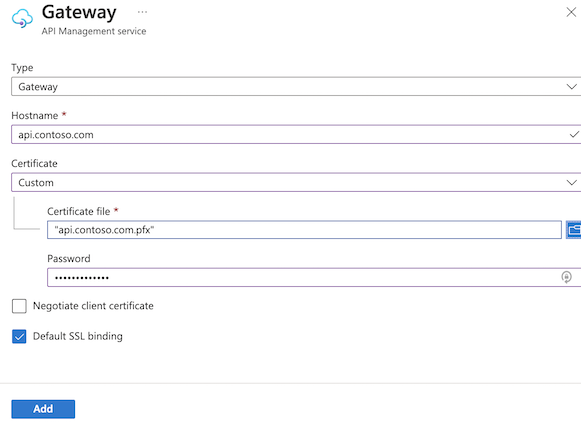
- Select Add, or select Update for an existing endpoint.
- Select Save.
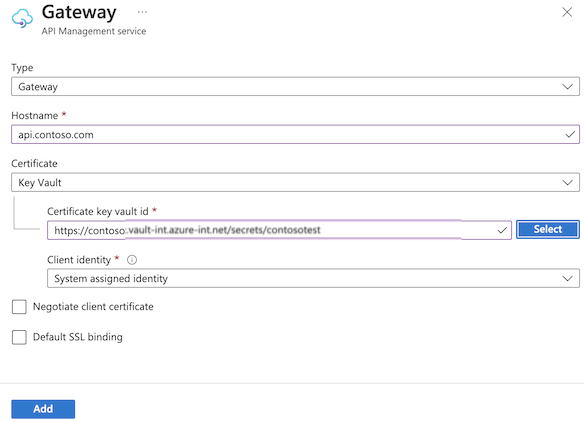
DNS configuration
Configure your DNS provider to map your custom domain name to the default domain name of your API Management instance.
CNAME record
Configure a CNAME record that points from your custom domain name (for example, api.contoso.com) to your API Management service hostname (for example, yourapim-service-name.azure-api.net). A CNAME record is more stable than an A record in case the IP address changes. For more information, see IP addresses of Azure API Management and the API Management FAQ.
Note
Some domain registrars only allow you to map subdomains when using a CNAME record, such as www.contoso.com, and not root names, such as contoso.com. For more information on CNAME records, see the documentation provided by your registrar or IETF Domain Names - Implementation and Specification.