Note
Access to this page requires authorization. You can try signing in or changing directories.
Access to this page requires authorization. You can try changing directories.
The following AI/BI and Genie One features and improvements were released in 2026.
Note
The released versions, dates, and content listed below correspond only to the actual deployment of Microsoft Azure cloud environments.
In most cases, they provide the evolution history of Azure Databricks AI/BI features in Azure Public Cloud. Please note that certain features, release schedules, and implementation details may not be consistent with the corresponding deployments in Microsoft Azure operated by 21Vianet.
Note
Releases are staged. Your Azure Databricks account might not be updated until a week or more after the initial release date.
September 2026
Dashboard enhancements
September 10, 2026
More Tableau calculations in
/importBI: Importing Tableau reports with the/importBIGenie Code command now supports more cases of parameterized calculations.Relationship-scoped filters (Public Preview): On a dashboard with relationships, each widget now responds only to filters whose dataset is related to it, so a filter no longer affects unrelated charts. See Dashboard relationships.
Choose the warehouse for materialization: When you export a dashboard dataset as a materialized view in Unity Catalog, you can now choose which SQL warehouse runs the materialization. See Export a dataset as a materialized view.
Include-style LOD expressions: The metric view editor now supports Include-style level of detail (LOD) expressions in YAML.
Scoped starter questions: On a published dashboard, Ask Genie's suggested starter questions are now scoped to the dashboard page and widget you're viewing.
Key insights per page: Key insights now generate for each dashboard page. A New insights badge appears only when new insights are available, along with a live-generating indicator.
Metric view reuse when building: When building a dashboard, Genie Code now prefers governed metric views over ad-hoc SQL datasets and reuses an existing metric view when one satisfies the request.
Export and import dashboard themes: You can now export a dashboard's theme to a JSON file and import a theme file into another dashboard, so you can reuse or share a theme without editing the dashboard JSON. See Export or import a theme.
Line shape control: Line and area charts now have a Line shape control that connects data points with linear, smooth, or stepped lines. See Line shape.
Color scale on pivot table text: The pivot table color scale now includes an Apply to setting, so you can paint the color gradient on the cell text as well as the background. See Value-level settings.
Path maps from point sequences: Path maps can now connect a sequence of ordered points into a line, from separate longitude and latitude columns or a single point geometry column, in addition to a single geometry line column. Use this for trajectories such as GPS tracks. See Path source.
Genie One enhancements
September 10, 2026
- Genie Code skills in Genie One (Beta): Genie Code skills now appear and are turned on by default in Genie One. Turn individual skills on or off on the customization page.
- Backend steering: You can now send steering messages to Genie One while it's answering, so you can guide a response without waiting for it to finish.
- PowerPoint uploads: You can now upload PowerPoint (
.pptx) files to a Genie One conversation.
Dashboard enhancements and bug fixes
September 3, 2026
- Embedded dashboard filter APIs: In embedded dashboards, you can now set and retrieve filter values through APIs. See Control dashboard filters programmatically.
- Ranked table calculations in
/importBI: Importing reports from Power BI and Tableau with the/importBIGenie Code command now includes ranked table calculations. - Color mappings: In a dashboard's theme settings, you can assign a specific color to a value by name. Any visualization that colors by that value uses the assigned color across the dashboard, for both color by field and color by series. See Consistent colors across widgets.
- Rich text for dynamic data references: You can now apply rich text formatting to dynamic data references in text widgets, widget titles, and descriptions.
- Dashboard variable improvements: Enhancements to dashboard variables:
- Multiple fields: Viewers can now add, remove, and swap multiple fields through a dashboard variable on a visualization, instead of switching one field at a time. See Use dashboard variables.
- Source dataset for options: Dashboard variable options now show their source dataset as a subtitle. See Create a dashboard variable.
- Metric view downloads respect display names: Downloads from a metric view now use the display names defined for its fields. See Local metric views.
- Always-visible scrollbars on faceted charts: Scrollbars now stay visible on scrollable faceted charts.
- Data attachments in Slack and Teams: Dashboard subscriptions delivered to Slack and Microsoft Teams can now include data attachments in CSV, TSV, or Excel format. See Data attachments.
- Cross-dataset filtering through relationships (Public Preview): When datasets are connected by a relationship, filters, selections, and parameters applied to one dataset now automatically carry across to widgets built on the related datasets. See Create dashboard relationships.
- Genie Code for dashboard authoring: New authoring capabilities and fixes for Genie Code:
- Improved automatic widget layout: When Genie Code adds widgets to a dashboard, it now places them in available layout space automatically.
- Smoother editing: Genie Code no longer appears to stall between edits, and multi-step edits apply with less delay between steps.
Genie One enhancements
September 3, 2026
- Push notifications for scheduled tasks (Public Preview): The Genie mobile app can now send push notifications for scheduled tasks to iOS devices. See Push notifications .
August 2026
Genie Agents enhancements
August 26, 2026
- Download visualizations API: Retrieving visualization results through the Genie Conversation API is now generally available. See Conversation API reference.
Dashboard enhancements and bug fixes
August 27, 2026
- Hide pages in published dashboards: Dashboard authors can now hide a page so that it doesn't appear when the dashboard is published, while keeping it in the dashboard for authors. See Hide a page in published dashboards.
- Path maps: You can now use the path map visualization to show routes and connections between locations on a map. See Map visualizations.
- Table column header alignment: You can now set left, center, or right alignment for table column headers, independent of the cell alignment. See Field-level settings.
Genie Agents enhancements
August 27, 2026
- Agent mode APIs: The Agent mode APIs for Genie Agents are now generally available. Run Agent mode programmatically to integrate it into your own applications, such as chatbots, scheduled reports, and internal tools. See the Agent mode API reference.
Genie One enhancements
August 27, 2026
Open Unity Catalog tables in Genie: You can now open Unity Catalog tables directly in Genie without navigating to Catalog Explorer. See Open tables.
- Tables in chat: Opening a table from chat keeps you in the conversation. View overview details, columns, and sample data next to your chat.
- Tables in Discover: Opening a table from Discover shows a full-page catalog-style view optimized for Genie.
- Ask Genie: From a table in Discover, click Ask Genie to start a chat about that table.
- Request access: If you only have browse access, you can request access from the table view.
Pin chats: You can now pin a chat in the Genie One sidebar to keep it at the top for quick access.
Rename chats: You can now rename a chat in the Genie One sidebar.
Visualizations in scheduled task emails: Scheduled task email outputs can now include visualizations.
Create scheduled tasks in the Genie mobile app (Public Preview): You can now create scheduled tasks directly from the Genie mobile app.
Dashboard enhancements and bug fixes
August 20, 2026
Import from Power BI and Tableau: Importing reports and data models from Power BI and Tableau with Genie Code (
/importBI) is now generally available.Larger Excel downloads: You can now download up to 1 million rows from a dashboard widget to Excel (
.xlsx), up from 100,000. See Download results.Multi-select and move widgets: Dashboard authors can now select multiple widgets and move them together on the canvas by holding Cmd or Ctrl while clicking. See Keyboard shortcuts.
Full-width tables in text widgets: Markdown tables in text widgets now use the full width of the widget instead of a fixed width.
Hide the sparkline and date labels on counters: You can now hide the sparkline and date labels on counter widgets. See Hide date labels and the sparkline.
Consistent colors across widgets: Charts that color by a categorical field now use the same color for the same value across every widget on a dashboard. See Consistent colors across widgets.
Duplicate subscriber prevention in the API: Dashboard subscription APIs now prevent duplicate recipients from being added.
Unsubscribe removes duplicate subscriptions: Unsubscribing from a schedule by email or from the dashboard now removes all duplicate subscriptions for that recipient. See Manage scheduled dashboard updates and subscriptions.
Local metric views: Local metric views are now generally available. Define fields, measures, and join relationships directly in an AI/BI dashboard with a visual interface, without first publishing them to Unity Catalog. See Local metric views.
Low-code UI for Unity Catalog metric views in dashboards: When you add a Unity Catalog metric view to a dashboard, it now uses the same low-code UI as local metric views, replacing the legacy UI. You can edit the metric view in Unity Catalog, or extend it locally to add dashboard-specific measures and fields. Unity Catalog metric views that use parameters can't be extended. See Extend a Unity Catalog metric view.
Genie Code for dashboard authoring: New authoring capabilities and fixes for Genie Code:
- Materialize datasets: Genie Code can now optionally materialize datasets.
- Manage email schedules: You can now manage dashboard email schedules directly from Genie Code.
- Set a schedule's tabular attachment: Genie Code can now set a schedule's tabular attachment, so a scheduled email includes widget data. See Email attachments.
- Visualization title fix: Fixed a bug where visualization title text overlapped the action icons in a Genie Code chat response.
Choropleth map fix: Fixed a bug that caused choropleth maps to crash when filtered results returned no data.
Waterfall cross-filtering fix: Fixed a bug where waterfall charts did not trigger cross-filtering.
Genie One enhancements
August 20, 2026
Scheduled task consistency: Scheduled tasks now look up past runs to keep run-to-run outputs consistent.
Export documents to PDF: You can now export Genie One documents to PDF.
Genie mobile (Public Preview): Enhancements to the Genie mobile app:
- Switch workspaces without signing out: You can now switch between workspaces from within the app instead of signing out and back in.
- Sign in behind account-level IP access lists: If you were blocked at mobile sign-in by an account-level IP access list, you can now sign in. If your workspace is restricted to your corporate network, off-network devices still need to reach it through that network, such as with a VPN or a managed device.
Dashboard enhancements and bug fixes
August 13, 2026
Remove duplicate subscribers: Dashboard authors can now remove duplicate subscribers from a dashboard schedule. See Manage scheduled dashboard updates and subscriptions.
Duplicate schedule emails fix: Fixed a bug where dashboard schedules could send duplicate emails to the same subscriber.
Reversed y-axis tooltip order fix: Fixed a bug where tooltips for line and area charts with a reversed y-axis listed their series in the wrong order.
Pivot table None transform fix: Fixed a bug where the None transform on pivot table values produced empty values.
Genie One enhancements
August 13, 2026
Ontology snippets now available to all customers (Public Preview): Ontology snippets in the Genie Ontology are now available to all customers. Customers no longer need to request access.
Workspace instructions: Workspace-level instructions for chat in Genie One are now generally available.
Dashboard enhancements and bug fixes
August 6, 2026
- Rich text in widget titles and descriptions: Visualization widget titles and descriptions now support rich text formatting. Click a widget's title or description to open a formatting toolbar, where you can apply text styling, links, and tables, or enter Markdown text directly. See Format widget titles and descriptions.
- Hide pivot table column headers: Dashboard authors can now hide the column header in a pivot table. See Value-level settings.
- Schedule run history: Dashboard authors can now see the run history for a schedule, including the run ID, start and end times, and status for each of the five most recent runs. See View schedule run history.
- Pivot table grand totals fix: Fixed a bug where grand totals and expand and collapse controls did not appear on pivot tables.
Genie One enhancements
August 6, 2026
Upload PDF files to a conversation (Beta): You can now upload PDF files to a Genie One conversation alongside CSV and Excel files. Genie One parses PDFs asynchronously.
Mention workspace users in document comments: In a document, you can now mention workspace users in a comment.
Genie Ontology enabled by default (Public Preview): The ontology is a unified context layer that gives Genie a business-aware map of your organization. It is now enabled by default.
Genie One free usage extended through January 31, 2027
August 3, 2026
Free usage of Genie One and Genie Agents is extended through January 31, 2027. This promotion was previously set to end on July 31, 2026. Budget controls do not apply during the promotional period. The promotion covers usage by users only. Service principals are excluded, and their usage continues to be billed.
July 2026
Dashboard enhancements and bug fixes
July 30, 2026
- Dashboard relationships from imported BI files: When you import a Power BI or Tableau file with Genie Code, migration tooling now creates dashboard relationships where it detects them in the source file.
Customize date picker quick-select options with Genie Code: You can now ask Genie Code for dashboard authoring to customize the quick-select options in a date range picker filter, such as keeping only day-based ranges. For an example prompt, see Optional: Customize the date picker quick-select options with Genie Code.
Semantic validation for AI-authored metrics: Genie Code for dashboard authoring now automatically runs a semantic validation check after it creates a widget. The check validates business definitions, grain, attribution, population, time window, units, scale, and category values to improve the accuracy and consistency of metrics.
Low-code filters on measures: Local metric views now provide a low-code option for adding filters to measures. See Step 3: Define a filter.
Improved low-code UI for imported metric views: Metric views imported from Unity Catalog now use an improved low-code UI for extensions and modifications. See Extend a Unity Catalog metric view.
Metric view display names on dashboard widgets: Dashboard widgets now show the display name defined for each field in a local metric view instead of the literal field name. See Local metric views.
Cross-filtering includes the facet field: Cross-filtering on a faceted chart now includes the facet field as part of the filter. See Apply cross-filtering.
Applied filters in email attachments: Dashboard authors can now include the applied filters as a separate tabular attachment in email subscriptions. See Data attachments.
Dark mode scrollbar fix: Fixed a bug where the filter drop-down scrollbar did not appear in dark mode.
Line chart tooltip fix: Fixed a bug where tooltips did not appear on line charts.
Genie One enhancements
July 30, 2026
Run a scheduled task on demand: When you author a scheduled task, you can now select Run now to run it immediately.
Rename a conversation: You can now rename a conversation by clicking its title in the chat header and editing it inline.
Enter a workspace URL when signing in to the Genie mobile app: You can now enter your workspace URL manually when you sign in to the Genie mobile app. This helps you sign in when automatic workspace discovery or the default sign-in flow doesn't work in your environment.
Dashboard enhancements and bug fixes
July 23, 2026
Import BI files (Public Preview): Importing Power BI and Tableau reports as AI/BI dashboards with Genie Code is in Public Preview.
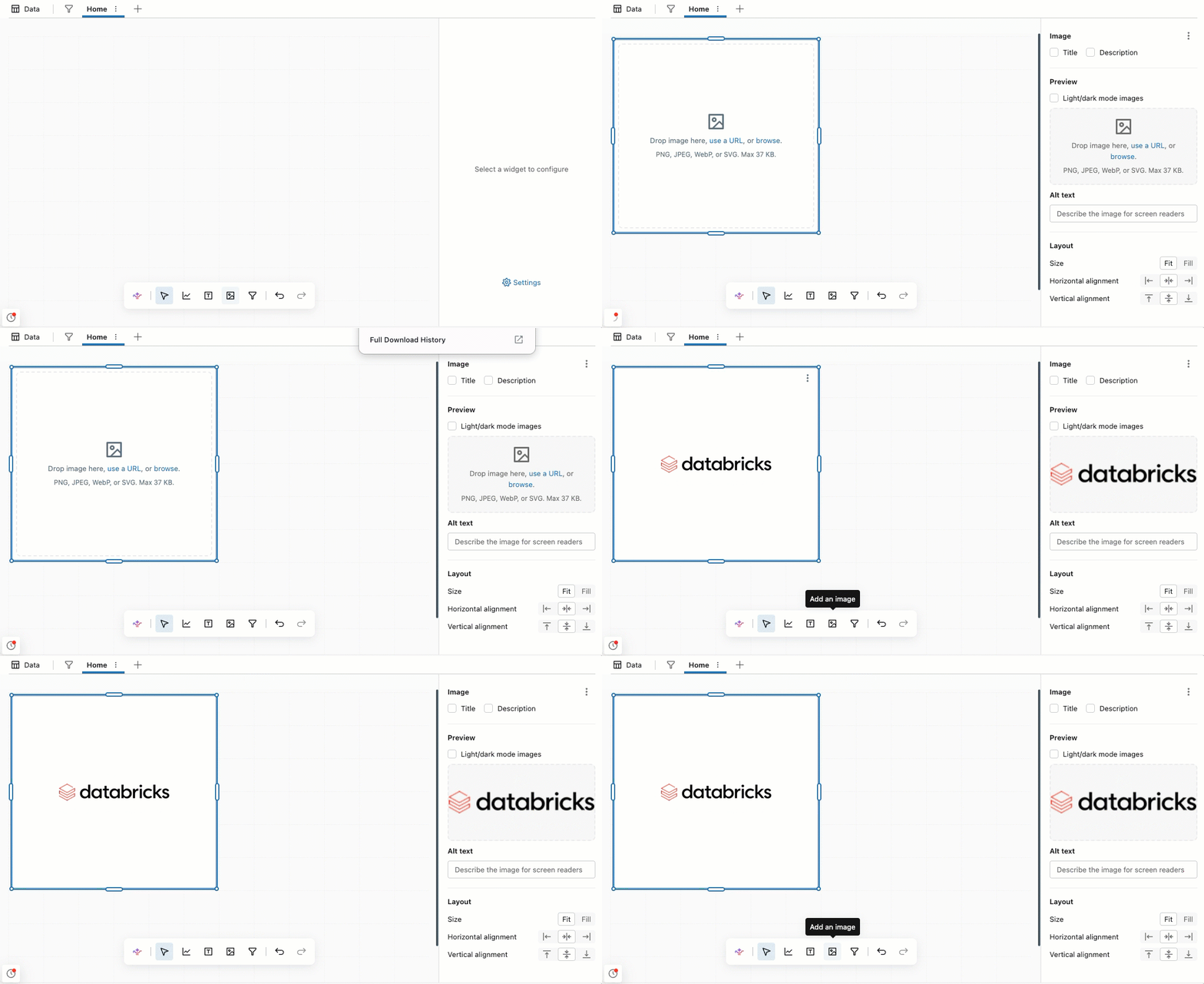
Image widget: You can now add a dedicated image widget to a dashboard. See Image widgets .
Multi-select filter improvements: Multi-select filter improvements:
- Multi-select filter stays open: Multi-select filter drop-downs now stay open between selections and keep your place in the list instead of closing.
- Select all matching values in a multi-select filter: In a multi-select filter, you can now type to narrow the list and select Select all results to select every matching value at once. Selections are additive across searches.
Dashboard variable display names: When a display name is available, dashboard variable drop-down menu options show the column's display name instead of the field name. To learn more about variables, see Create a dashboard variable.
Cross-filtering text-selection fix: Fixed a bug where selecting text in a table unintentionally triggered cross-filtering.
Dark mode filter dropdown scrollbar fix: Fixed a bug where the scrollbar in dashboard filter dropdowns wasn't visible in dark mode.
Genie One billed usage corrections
July 21, 2026
Genie One usage is free through January 31, 2027.
Beginning July 21, 2026, Databricks is applying a correction so that Genie One usage is properly reflected as free across your billing data and budgets:
System tables: Correction records land in
system.billing.usagethat negate prior Genie One billed usage, so that aggregated billable usage is zero. See Record type reference.Budgets: Genie One costs are netted out of budget enforcement. As a result, spend shown in the budget UI will drop slightly. In some cases, a user who was previously over their budget threshold may fall back under it once their Genie One and Genie Agents costs are netted out.
Dashboard enhancements and bug fixes
July 16, 2026
- Git folders: Git folders for dashboards are now generally available. See Version control dashboards with Git.
- Run a schedule on demand: You can now select Run now on a dashboard schedule to run it immediately. See Manage schedules.
- Improved Ask Genie starter questions: Ask Genie suggests better starter questions for dashboards and caches them to reduce latency.
- Genie Code error handling: When you author a dashboard with Genie Code, it now returns an error instead of retrying SQL queries that are not valid. This behavior reduces the cost of query errors.
- Bookmark icon visibility: When viewing a published dashboard, the bookmark icon no longer appears if a dashboard has no bookmarks.
- Ask Genie health-check fix: Ask Genie no longer shows a health-check warning when the linked Genie Agent is still usable.
- Dashboard creation fix: Fixed a bug where some authors with the SQL access entitlement could not create or clone dashboards.
- PNG download fix: Fixed a bug where custom fonts were dropped from the chart title and legend in single-widget PNG downloads.
- Waterfall chart fix: Fixed a bug where y-axis formatting options on a waterfall chart did not work.
Genie One usage is free through January 31, 2027
July 15, 2026
Genie One usage is free through January 31, 2027. Budget controls do not apply during this time.
Genie One enhancements
July 9, 2026
Document citations: Documents now show citations that link content back to the data and sources Genie One used to generate the document.
Document version history: Documents now keep a version history so you can review earlier versions.
Open document links in soft tabs: Documents now support soft tabs, so you can open links without leaving the document.
GitHub MCP (Beta): The GitHub MCP connection for Genie One is now in Beta.
Certified visualizations: SQL charts and visualizations that Genie One inserts are now read-only and appear as certified visuals.
Dashboard enhancements and bug fixes
July 9, 2026
English names for choropleth regions: Choropleth maps now support English region names from the
name_encolumn as the identifier for admin-0 (country) boundaries. See Region.Empty multi-select filter defaults in Genie Code: Genie Code can now use an empty multi-select (All) default for parameter filters instead of requiring a single default value.
Cluster-by and partition-by for local metric views: Local metric views now support cluster-by and partition-by configuration in the UI and YAML. See Local metric views.
Apply filters fix: Fixed a bug where the apply button on filters cleared the text input instead of applying the filter.
Dashboard import fix: Fixed a bug where importing a dashboard failed if it contained a bookmark that referenced a deleted widget.
Genie One enhancements and bug fixes
July 2, 2026
Ontology snippets (Public Preview): Genie One now supports ontology snippets. This feature is in Public Preview. Contact your Databricks account team to sign up.
Document edit timestamps: Documents now show the date and time they were last edited.
Links in documents: Documents now support links.
Scheduled tasks: Fixed a bug that prevented scheduled tasks from running.
Dashboard enhancements and bug fixes
July 2, 2026
Import reports from Power BI and Tableau: Authors can now import Power BI and Tableau reports as a new AI/BI dashboard directly from the dashboard list page.
Improved metric view reuse when importing: When importing Tableau and Power BI reports as AI/BI dashboards, Genie Code is now more likely to reference existing Unity Catalog metric views instead of creating new ones.
STRING_AGGfunction: You can now useSTRING_AGGto concatenate non-null string values within a group, with an optional custom delimiter. Seestring_aggaggregate function.Custom Vega visualization improvements: Two enhancements for custom Vega-Lite visualizations.
- Cross-filtering now works for Vega-Lite charts. The selection appears in the active filter bar and is preserved in dashboard URLs and share links.
- Custom Vega-Lite charts can now inherit the dashboard's light or dark mode and custom theme, and authors can reference theme values directly in Vega-Lite expressions.
Counter widget comparison styling: Counter widgets now support text styling on the comparison date and conditional coloring on the comparison field. See Counter visualization.
More compact filter widgets: Filter widgets on the dashboard canvas now appear more compact.
Dynamic table column widths: Table columns now adjust their width automatically based on cell content.
Apply filters fix: Fixed a bug where applying filters did not work.
Table column resize fix: Fixed an issue where resizing a table column could unintentionally trigger a sort on that column.
Combo chart hover fix: Fixed a console error that sometimes occurred when hovering over empty areas of a combo chart.
Dashboard relationships (Public Preview)
July 1, 2026
- Dashboard relationships (Public Preview): Build complex multi-fact data models scoped to an AI/BI dashboard.
June 2026
Genie One enhancements
June 25, 2026
Share chats with account users: You can now share Genie One chats with all users in your account as read-only.
Scheduled task frequency limit: Scheduled tasks can no longer be created with a frequency greater than daily. Hourly and per-minute frequencies are no longer supported. Contact your Databricks account team if you require more frequent scheduling.
Scheduled task email prefix: Scheduled task notification emails now use the prefix "Genie Task:" instead of "Task update:".
Dashboard enhancements and bug fixes
June 25, 2026
- Dynamic annotation lines: Annotation lines can now be driven by data or a calculation instead of a fixed value, letting you show running averages, variable thresholds, or anomaly markers that update with your data. See Annotations.
- Six new preset themes: Six new built-in color and style themes are now available for AI/BI dashboards, giving authors more ready-made options without creating a custom theme. See Choose a preset theme.
- Local metric view and dashboard relationship fix: Fixed a bug where local metric views and dashboard relationships sometimes failed when referencing assets from a Hive Metastore.
- Faceted chart fix: Fixed an issue where faceted charts with a
DECIMALfacet column dropped most rows in each facet. - Combo chart hover bug fix: Fixed an issue where hovering over buckets with null line or area values showed an incorrect tooltip and drew a stray point at the baseline. Null values now remain null instead of displaying as 0.
Genie One enhancements
June 18, 2026
- Scheduled tasks for consumer entitlement users: Consumer entitlement users can now create scheduled tasks without needing the SQL entitlement.
Dashboard enhancements
June 18, 2026
Table header color customization: Authors can now set font color, background color, and text formatting for table column headers. See Table layout settings.
Local metric view parameters: Local metric views now support parameters, allowing Azure Databricks to dynamically change query inputs based on user selections in a UI. See Local metric views.
Local metric view wildcard expressions: Local metric views now support wildcard expressions, which allows users to inherit all fields from upstream tables or metric views. See Local metric views.
Power BI enhanced report format support (Beta): Genie Code now supports Power BI files exported with the Power BI enhanced report format (PBIR).
Image upload suggestions for Power BI and Tableau imports (Beta): Genie Code now suggests that authors upload images when importing files from Power BI and Tableau to improve migration quality.
Genie One enhancements
June 15, 2026
- Chat in Genie One: Chat in Genie One is now generally available. Chat provides a unified interface for asking data questions in natural language using your Genie Agents (formerly Genie Spaces), dashboards, queries, and metric views.
- Documents in Genie One: Creating and sharing documents from Genie One chat conversations is now generally available. Ask Genie One to draft a document, or click Draft a document from the homepage. Genie One generates the document and opens it in a canvas pane alongside the conversation, where you can edit and share it.
Dashboard enhancements and bug fixes
June 11, 2026
Gantt charts now available: Gantt charts display tasks as horizontal bars on a continuous axis to visualize project schedules, manufacturing workflows, and other time-ranged events. Each bar requires matching start and end field types (date, datetime, or numeric). See Gantt chart.
Custom visualizations (Public Preview): Build custom charts with the Vega-Lite library for customization beyond the built-in visualization types.
Per-category font customization: You can now customize fonts per category across all visualization types. See Customize colors and fonts.
Table row cross-filtering and drill-through: Select table rows to cross-filter, or right-click to drill through. See Apply cross-filtering.
Cross-filtering and drill-through: Line, combo, and area charts now support cross-filtering and drill-through filters. See Use drill-through to filter data.
Dashboard details in draft mode: Draft mode now shows dashboard details, making it easier to find dashboard managers and the dashboard's location.
New metric view low-code editor syntax (Public Preview): The following syntax is now available in the metric view low-code editor:
JOIN … RELYWINDOW OFFSETWINDOW INCLUSIVITY
Genie Code metric view usage: Genie Code now relies more heavily on Unity Catalog metric views rather than creating local ones.
Global filters pane fix: Fixed a bug where the global filters pane did not open on a user's first view of a dashboard.
Widget copy-paste fix: Fixed a bug where users could not copy and paste widgets across dashboards.
Tableau line chart import fix (Beta): Fixed an issue where multi-series line charts imported from Tableau files were recreated as separate line charts.
Genie One enhancements and bug fixes
June 11, 2026
- Account-level Genie customization: You can now customize Genie at the account level, including colors, a logo, a markdown welcome message, and pinned content. See Customize the Genie One homepage.
- Email tool for scheduled tasks: Scheduled tasks now use an email tool to send emails, enabling more customized email formats and send conditions.
- Custom MCP server fix (Public Preview): Fixed an issue that prevented custom MCP servers from being used in Genie One.
Genie renamed to Genie One
June 9, 2026
Genie, the Azure Databricks AI experience for business users, has been renamed to Genie One. The feature and its capabilities are unchanged. See Use Genie One.
Dashboard enhancements
June 4, 2026
- Bookmark filter combinations: Dashboard authors can now save filter combinations as shared bookmarks, which viewers can quickly apply. See Bookmarks.
- Pivot table column improvements: Pivot table columns can now expand and collapse. See Pivot table configuration.
- Theme customization enhancements: New theme customization options are now available, including the ability to change axis and grid line colors, adjust widget layout (margin, padding, corner radius, and shadow), and apply a color ramp. See Manage AI/BI dashboard workspace themes.
- Workspace theme settings: New theme settings are now available in workspace-level themes and automatically apply to new dashboards. See Manage AI/BI dashboard workspace themes.
- Dashboard variables: Dashboard authors can now create dashboard variables that allow viewers to swap fields on visualizations. See Use dashboard variables.
- Customizable table headers: Dashboard authors can now customize table column headers. See Table configuration.
- Field picker improvements: Field pickers now show which dataset each field belongs to. Combo charts on semantic models use the data field picker for the Y-axis, and tables support adding the same field more than once. This release also includes truncated dataset labels, tooltips on disabled menu items, and a relocated filter toggle.
- Widget-level color gradient: You can now derive a color gradient from the visualization color at the widget level, matching the behavior available in theme settings.
Genie One enhancements
June 4, 2026
Workspace-level Genie One customization: Workspace admins can now customize Genie One at the workspace level. Under workspace settings, admins can configure colors, a logo, a markdown welcome message, and pinned content. See Customize the Genie One homepage.
Certified object prioritization: Chat in Genie One now acknowledges and prioritizes certified objects.
User skills (Public Preview): You can now create personal user skills to extend chat in Genie One with custom capabilities. A skill is a repeatable task you teach Genie One once and run whenever you need it, such as building your weekly metrics report.
Rich output (Public Preview): Genie One responses for non-SQL answers, such as search results and MCP reads, can now include rich HTML, CSS, and JavaScript content, enabling more varied data presentations beyond plain prose.
Genie Ontology (Public Preview): Genie One now automatically builds and maintains a map of your business by extracting and ranking knowledge from sources such as dashboards, notebooks, and pipelines, improving response accuracy and reducing latency.
May 2026
Dashboard enhancements and bug fixes
May 28, 2026
Banded rows in tables: Tables can now display banded rows.
Custom geographies in maps: Custom geographies are now available in choropleth and point maps. See Custom geographic data.
Median and percentile expressions in metric views: Low-code metric view building now supports two new expression types: median and percentile. See Create a metric view.
AGGREGATE OVERenhancements: TheAGGREGATE OVERoperator now supports an optionalINCLUSIVEorEXCLUSIVEkeyword forTRAILINGandLEADINGranges, and an optionalOFFSETclause that shifts the range by a specified interval. See Aggregate window functions.Point map shape field: Point maps now support a shape field to differentiate data points by category.
Default table sorting: Tables now support default sorting, allowing dashboard authors to define a default sort order for table columns.
Aggregated variable Y-axis fix: Fixed a bug where adding an aggregated variable to a bar, line, or area chart's Y-axis prevented adding a second field.
Symbol map interaction fix: Fixed symbol map interaction issues where clicking an empty area did not deselect markers and the cursor did not indicate that markers were clickable on hover.
Cross-filter conditional formatting fix: Fixed a bug where cross-filter hover and selection styling overrode conditional formatting colors on table cells.
SQL Editor results visibility fix: Fixed an issue where filtered results in the SQL Editor were not visible even though the data was present, caused by the table container collapsing within the page layout.
Symbol map field picker fix: Fixed an issue where the latitude and longitude field pickers in the symbol map editor did not work when using a semantic model as a dataset.
Dashboard enhancements and bug fixes
May 21, 2026
- Open-source fonts: Over 20 new open-source fonts are now available as defaults. See Customize colors and fonts.
- Parameter values in text widgets: Dashboard authors can now reference parameter values in text widgets. See Use parameters in text widgets.
- Genie Code non-table outputs: Genie Code can now render non-table outputs, including charts, text blocks, and other content.
- Answer now for Genie on published dashboards: Genie on published dashboards now supports Answer now. Answer now stops Genie from thinking and produces an immediate answer to the user question, at the cost of deeper analysis.
Genie One enhancements
May 21, 2026
- Direct link to associated dashboard: Genie One now surfaces a direct link to the associated dashboard when hovering over entities in the chat pane.
- Ask Genie on the workspace homepage: Ask Genie has been added to the workspace homepage. See Homepage.
Dashboard enhancements and bug fixes
May 14, 2026
- Error bars on line charts: Line charts now support displaying error bars as bands.
- Custom SQL measure bug fix (Public Preview): Fixed a bug where a measure defined using the custom SQL option would fail if a dataset-scoped measure didn't specify the full name path. For example,
sum(orders.field)was previously required rather thansum(field). - Genie Code dashboard visualization authoring: Genie Code can now author the full set of dashboard visualization configuration options.
Genie One enhancements and bug fixes
May 14, 2026
- Additional chat audit logs in Genie One: Nine new
genieChataudit events are now available for granular tracking:mcpToolInvocation,steerGenieChatConversation,updateGenieChatConversationFeedback,cancelGenieChatConversation,getGenieChatConversation, and scheduled task operations (createScheduledTask,getScheduledTask,updateScheduledTask,deleteScheduledTask). See Chat events in Genie One. - Chat input fix in Genie One: Fixed a bug where text lingered in the chat input field after submission.
- Simplified email text formatting for scheduled chat tasks in Genie One: Email text formatting for scheduled tasks is now more viewer friendly.
Dashboard enhancements and bug fixes
May 7, 2026
- Improved error messages: Dashboard error messages can now be more easily viewed and copied.
- Reset draft API: An API is now available for dashboard authors to reset the draft to the last published version.
- Undo-redo on the data page: Dashboards in draft mode now support undo and redo on the data page.
- Y-axis fix: Fixed a bug where the Y-axis of faceted bar and area charts started at -0.5 instead of 0.
- Multi-select filter fix: Fixed a usability issue where multi-select filters always scrolled to the top of the list after a selection.
- Local metric view Hive Metastore fix (Public Preview): Fixed an issue causing local metric views to fail when referencing Hive Metastore tables rather than Unity Catalog tables.
- Local metric view preview fix (Public Preview): Fixed an issue where preview charts for measures and dimensions defined in a local metric view were not rendering in the data tab.
- Metric view SQL editor improvements (Public Preview): Several UX improvements to the metric view SQL editor, including taller SQL and expression editors in the side pane, layout padding improvements, and a cropping fix in the join modal table source selector.
- Local metric view join autofill (Public Preview): Local metric views now autopopulate join conditions when joining two or more tables.
April 2026
Dashboard enhancements and bug fixes
April 30, 2026
- Publish with service principal credentials: Authors can now publish dashboards using the data credentials of a service principal. See Publish a dashboard.
- Service principal draft view fix: Fixed a bug where a dashboard published via a service principal loses the ability to view draft.
- Text widget menu fix: Removed Show visualization query from the kebab menu on text widgets.
- Service principal ownership: Workspace admins can now transfer dashboard ownership to a service principal in the UI. See Transfer ownership of a dashboard.
- Choropleth map admin levels: Choropleth maps now support US admin levels 3 (regions, multi-state groupings) and 4 (states). See Map visualizations.
- Publish notification fix: Fixed a bug where a publish success notification appeared even if the underlying publish failed.
- SQL editor line numbers: The SQL query editor now displays line numbers to help with legibility and debugging.
- PDF subscription page selection: Dashboard authors can now select which pages to include in PDF email subscriptions. See Manage scheduled dashboard updates and subscriptions.
- Parameter values in widget titles and descriptions: Dashboard authors can now reference parameter values in widget titles and descriptions, so the text updates dynamically as viewers change parameter selections. See Work with dashboard parameters.
Databricks One renamed to Genie
April 27, 2026
Databricks One, the simplified Databricks interface, has been renamed to Genie. The feature and its capabilities are unchanged. Genie enables users to:
- View and interact with AI/BI dashboards to track key performance indicators (KPIs) and analyze metrics.
- Ask data questions in natural language using Genie.
- Use custom-built Databricks Apps that combine analytics, AI, and workflows.
See Use Genie One.
Dashboard enhancements and bug fixes
April 23, 2026
- Table cross-filtering and drill-through: Tables now support cross-filtering and drill-through.
- Counter prefix and suffix: Numbers in counters now support custom prefixes and suffixes. See Format template.
- Schema browser default dataset type (Public Preview): Adding a table to a dashboard from the schema browser now creates a local metric view by default instead of a SQL dataset.
- Service principal dashboard fix: Fixed a bug where dashboards published as a service principal continued to run temporarily even after the service principal was disabled.
Dashboard enhancements and bug fixes
April 16, 2026
- Warehouse overload message: Dashboards now show a message explaining when rendering is delayed due to the warehouse being overloaded.
- Tabular attachments in email subscriptions: Dashboard email subscriptions now include tabular attachments.
- Fullscreen scroll position: Exiting fullscreen mode on a published dashboard now returns you to your previous scroll position instead of jumping to the top of the page.
- Widget query batch fix: Fixed a bug where a widget query failing for one widget caused all other widgets in the same query batch to fail.
Visualization enhancements
April 16, 2026
- Dashed and dotted line styles: You can now style lines as dashed or dotted in the Pattern section of the configuration pane.
Metric view enhancements
April 16, 2026
- Measures and dimensions creation use Builder mode by default (Public Preview): Builder mode, the UI-based transformation tool, is now the default experience for editing measures and dimensions in metric views.
Dashboard enhancements
April 9, 2026
Local metric views (Public Preview): A new dataset type lets you create metric views directly in a dashboard using a low-code visual interface, without publishing to Unity Catalog first. See Local metric views.
Edit hex color values inline: Authors can now click directly on a hex color value to edit it in place.
View SQL for visualization widgets: Authors can now view the SQL behind specific visualization widgets while in draft mode. See View the visualization query.
External embedding is now generally available: Embedding dashboards for external users is now generally available. See What is embedding for external users?
Waterfall chart totals: Waterfall charts with categorical X-axis now support a total bar.
Scatter plot shape field: Scatter plots now support a shape field to differentiate data points by category.
Vertical annotations with dual axis: Fixed a bug where vertical annotations did not appear in charts with dual axis enabled.
Text widget character limit: Fixed a bug where the text widget accepted more characters than supported but silently failed to save.
Genie One enhancements
April 9, 2026
- Account-level Genie One is now generally available: Account-level Genie One now includes Databricks Apps, Domains, and Genie. See Use Genie One.
- Updated workspace Genie One navigation: The workspace Genie One left-hand navigation has been updated and now includes Genie Code chat history.
Dashboard enhancements and bug fixes
April 2, 2026
- Clear applied filters individually: Dashboard viewers can now individually clear applied filters from the active selection bar.
- Text box vertical alignment: Text box widgets now support vertical alignment (top, center, and bottom).
- Choropleth map boundaries: Choropleth maps now support additional boundary types, including ZIP code and NUTS regions.
- Waterfall chart total bar visibility: The waterfall chart editor now hides the total bar toggle when the x-axis configuration doesn't support it, reducing authoring confusion.
- Embedding disabled error message: Fixed an error message when embedding is disabled to clarify that the workspace administrator, not the account administrator, must update the workspace setting.
- Y-axis label alignment: Fixed an incorrect width measurement for horizontal y-axis labels that caused misaligned axis text.
- Filter picker label truncation: Long field and parameter names in the filter picker dropdown are now truncated to prevent layout overflow.
Genie One enhancements
April 2, 2026
- Account Genie One is now in Public Preview: Account-level Genie One is now in Public Preview. Genie One provides a single location to view dashboards, apps, and Genie across all workspaces. See Use Genie One.
- Navigation between Genie One surfaces: Users can now navigate between Account Genie One and workspace Genie One.
March 2026
Dashboard enhancements and bug fixes
March 26, 2026
- Legacy dashboard color palette setting removed: The workspace setting for the legacy dashboard color palette has been removed, as legacy dashboards are no longer supported. AI/BI workspace-level color palettes remain available and unchanged.
- Collapsible visualization editor: The visualization editor is now collapsible when editing draft dashboards.
- Field comments on hover: When configuring visualizations on a draft dashboard, hovering over a field now displays the comment associated with the underlying field.
- Waterfall chart total bar: The waterfall chart editor now includes a Show total toggle that renders a cumulative total bar alongside incremental change bars.
- Simplified scheduling UI: The dashboard scheduling interface has been redesigned for easier setup and navigation. See Create a schedule.
- Advanced cells in pivot tables: Pivot tables now support advanced cells including image, HTML, JSON, and link. See Pivot table configuration.
- Parameters in custom calculations: Custom calculations now support parameters. See Use parameters in custom calculations.
- Annotation render loop fix: Fixed an infinite render loop on some dashboards with charts that have annotations.
- Loading and no-data state display: Visualizations now correctly distinguish between loading and no-data states, and disable the animation slider while data loads.
- Dot notation in field names: Visualization expressions now correctly handle field names that contain dots.
Connect external data sources to chat in Genie One (Beta)
March 23, 2026
You can now connect external data sources such as Google Drive or SharePoint to a chat conversation in Genie One, allowing chat to search your company documents when answering questions. Each user authenticates individually using their own credentials. You can also connect custom MCP servers as additional data sources. See Connect to external tools and sources .
Dashboard enhancements and bug fixes
March 19, 2026
- Date filter keyboard input: Fixed an issue where entering a date value via keyboard for relative date ranges failed to accept the input.
- Dashboard theme color palette: Fixed a bug where the visualization color palette was hidden when editing dashboard themes at the workspace level.
- Pivot table column width: The minimum width of pivot table columns is now 30px, reduced from 50px.
- Drill-through for pivot tables: Drill-through filters are now available for pivot tables. See Use drill-through to filter data.
- Dashboard snapshot audit logs: Fixed a bug where audit logs for
triggerDashboardSnapshotincluded internal system calls from thumbnail generation and probe snapshots. These internal requests are now excluded from the audit logs. - Custom font data labels: Custom dashboard fonts now apply to data point labels.
- Forecast x-axis time binning: Forecast visualizations now properly apply x-axis time binning.
- Pivot table date cell formatting: Pivot table date cells no longer wrap at hyphens.
- Dashboard subscription audit logs: Audit logs now include the
sendDashboardSnapshotevent when a dashboard subscription sends a snapshot to a Slack or Teams destination. See AI/BI dashboard events.
Dashboard enhancements and improvements
March 12, 2026
- Dashboard embedding for external users is generally available: Embed AI/BI dashboards in external applications without requiring viewers to have Azure Databricks accounts. See What is embedding for external users?.
- Hide Databricks logo in embedded dashboards: Externally embedded dashboards now support hiding the Databricks logo using the
hideDatabricksLogooption. See Hide the Databricks logo. - Metric view lineage highlighting: Hovering over metric views in the lineage pane now highlights the visualizations built on those metric views.
- Certification and deprecation icons in lineage: Data objects in the dashboard lineage pane now show their certification or deprecation status.
- Clear individual active filters: You can now remove a single filter selection from the active filter bar without resetting all active filters.
- Mobile layouts: Dashboards now automatically render in a mobile-friendly layout when viewed on small screens in Genie One. See Mobile layout.
- Custom subscription email subjects: When configuring a dashboard subscription, authors can now edit the subject line of notification emails sent to subscribers.
- Accounting-style number formatting: Number fields now support accounting-style formatting, which displays negative values in parentheses and vertically aligns currency symbols. See Format numeric values.
- Custom fonts: Dashboard authors can now select custom fonts for dashboards. Fonts must be preinstalled on viewer machines. If a font is not available, dashboards fall back to Databricks default fonts. See Set a custom font.
Account-level Genie One (Beta)
March 12, 2026
Account-level Genie One is now available in Beta. Users can now discover and interact with AI/BI dashboards from all workspaces in their account from a single entry point. Account-level Genie provides a unified homepage, cross-workspace search, and recommendations and favorites across workspaces. See Account-level Genie.
Dashboard enhancements and improvements
March 5, 2026
- Embedded dashboard kebab menu: The Copy link to widget option is no longer shown in the kebab menu for embedded dashboards.
- Dashboard import warehouse ID fix: Importing a dashboard without a specified warehouse ID no longer clears the previously selected warehouse.
- End of life for legacy dashboards: Legacy dashboards (previously referred to as Databricks SQL dashboards) have reached end of life and are no longer available.
- Bar and line chart x-axis spacing fix: The x-axis spacing of temporal data labels is now consistent between bar and line charts.
- Pivot table drill-through filters: You can now drill through data in pivot tables. See Use drill-through to filter data.
- Point map recentering on filter changes: Point maps automatically recenter to show relevant data when a filter is applied.
- AI chart suggestion fix: AI generated chart suggestions no longer disappear in some scenarios.
- Waterfall chart faceting: You can now apply faceting (also known as trellis or small multiple charts) to waterfall charts.
February 2026
Dashboard enhancements and improvements
February 26, 2026
- Unity Catalog metric view lineage: Dashboard info now shows Unity Catalog metric views in the lineage section.
- Dashboard refresh cancellation: Cancelling a dashboard refresh now shows the last available data instead of an error.
DD-MM-YYYYdate format: TheDD-MM-YYYYdate format is now available for date fields.- Date range parameter All selection: Date range parameters now support All. When All is selected, the parameter value is
nulland all rows are returned. See Apply date range parameters. - Genie agentic experience (Public Preview): Genie for dashboard insights now offers an agentic experience (Public Preview) by default.
- Point map recentering: Point maps now recenter upon relevant points when a filter is applied.
- Datetime drop-down menu fix: Fixed an issue where datetime drop-down menus could not be set in the global filters pane.
Dashboard visualization and interaction enhancements
February 19, 2026
- Pivot table hierarchies: You can now expand and collapse hierarchies in pivot tables.
- Stacked bar chart labels: Stacked bar charts now support showing min/max label values and total labels.
- Area and line chart sorting: Area and line charts now support sorting axes by measures.
- Dashboard content search: Global search in Lakehouse and Genie One now matches on dashboard content, not just titles.
- Chart faceting: Charts now support faceting (also known as trellis or small multiple charts), rendering one chart per dimension value. See Faceting.
Dashboard enhancements and improvements
February 12, 2026
- Workspace admin theme permissions: Fixed a bug where workspace admins couldn't edit workspace-level themes.
- Level of detail calculations: Level of detail calculations now support
EXCLUDEsyntax on multiple fields. See Defining expressions at a coarser level of detail. - Color legend sorting: You can now sort color legends by another field in visualizations.
- Pivot table cell styles: Pivot tables now support HTML, JSON, and image cell styles.
- Pivot table cross filtering: Pivot tables now support cross filtering.
- Table resizing: You can now resize table and pivot table headers and columns.
- Histogram and funnel chart labels: Histogram and funnel charts can now show total labels.
- Assistant for dashboard authoring improvements: Assistant for dashboard authoring now supports creating labels and setting color values.
- Multi-select parameter enhancement: Multi-select parameters now support selecting all values. See Allow multiple selections.
- Table visualization enhancements: Table visualizations now support aggregations and measures, inherit formatting from locales, and support background color styling, including conditional formatting and color gradients. As a result of this change:
- Table formatting now uses the visualization library's formatting capabilities, ensuring consistency and allowing inheritance from locale settings.
- The resize columns option has been removed to reduce bugs. Set column widths in the Style tab instead.
- Dashboard grid expansion: Dashboard layouts in the canvas now support 12 columns across instead of 6, providing more flexibility for widget placement.
Dashboard enhancements and new capabilities
February 5, 2026
Parameterized dashboard tasks: Dashboard tasks in Jobs can now be parameterized, allowing job parameters to dynamically set dashboard filter values at runtime.
Workspace-level dashboard themes: Dashboard themes can now be configured at the workspace level. See Manage AI/BI dashboard workspace themes.
Top-aligned text widgets: Text widgets now default to top-aligned text.
Refresh-only schedules for individual data permissions: Authors and viewers of dashboards published with individual data permissions can now create refresh-only schedules that trigger cache refreshes without sending notifications, improving dashboard load times. See Subscribe to an existing schedule.
Tag search: Tag search is now supported for dashboards, allowing users to find dashboards by their assigned tags.
Assistant for dashboard authoring (Beta): Authors can now automate multi-step dashboard workflows using natural language prompts to create datasets, visualizations, layouts, and filters. The legacy inline-visualization prompting experience now redirects to the Assistant side pane.
Genie One app thumbnail support
February 5, 2026
- App thumbnail uploads: Customers can now upload thumbnails as the preview image for Databricks apps.
Partner-powered AI features are now supported in the Canada, Brazil, and United Kingdom Azure Geographies
February 4, 2026
Partner-powered AI features in Canada, Brazil, and the United Kingdom that run with cross-Geo processing disabled now use models hosted in the same Azure Geography as the workspace. This aligns model hosting with Azure Geographies and ensures consistent regional availability.
Impact on user experience:
- Most AI features continue to work as expected with no action required.
- Some AI capabilities that depend on models not currently hosted in your Azure Geography might no longer be available with cross-geo processing disabled. See Availability of Designated Services in each Geo for more information on which features require cross-geo processing.
- If you rely on a feature that is no longer available in your Azure Geography, enable cross-geo processing to allow that feature to continue using models hosted outside your Azure Geography.
- For workspaces in these Azure Geographies, AI features will only use Databricks-hosted models if both partner-powered AI features and Enforce data processing within workspace Geography for Designated Services settings are disabled. If partner-powered AI features is disabled and Enforce data processing within workspace Geography for Designated Services is enabled, then AI assistive features are not be available in the workspace.
January 2026
Dashboard visualization and data improvements
January 29, 2026
- Fixed access request availability: Resolved an issue where the option to request access was not available and a "Resource not found" error was incorrectly shown.
- Full-width pivot tables: Widgets now render pivot tables at full width for better readability.
- Tooltip fields on charts: Combo and dual-axis charts now support tooltip fields.
- Image rendering in pivot tables: Cells can now display images directly in pivot tables.
- Dark mode scrollbar visibility: Scrollbars are now easier to see when using dark mode.
- Increased pivot data download limits: Download limits now support up to 10,000 rows by 1,000 columns for pivoted data.
- Fixed filter paste behavior: Resolved an issue where pasting a comma-separated list into a single-select filter only parsed the first element instead of keeping all values.
- Fixed stacked chart label rendering: Labels on stacked charts with a quantitative x-axis now render correctly in notebooks and in the SQL Editor.
Genie One search and discovery improvements
January 22, 2026
- Databricks Apps filtering: Genie One consumers can now filter to include or exclude inactive Databricks apps when browsing. Inactive apps are those with a status other than Running, such as Stopped, Deploying, or Crashed.
- Dashboard widget title search: Search now supports dashboard widget titles.
- Enhanced search rankings: Certified and favorite content is now boosted in search rankings in Genie One.
- Recents and favorites in discovery: Recents and favorites are now surfaced in the For you page.
Dashboard subscriptions, custom calculations, and visualization improvements
January 22, 2026
- Account-level user subscriptions: Dashboard authors can now subscribe account-level users to scheduled dashboard updates. See Manage scheduled dashboard updates and subscriptions.
- Microsoft Entra ID user subscriptions: Dashboard authors can now subscribe users in Microsoft Entra ID to scheduled dashboard updates when automatic identity management is enabled.
- Custom calculation references: Custom calculations can now reference custom calculations on dashboard datasets. See Referencing other calculations.
- Cumulative totals on stacked bar charts: Stacked bar charts can now display the cumulative total of values.
- Improved tooltips on combo and dual axis charts: Tooltips are now easier to access when hovering over combo and dual axis charts.
- Fixed static widget filter drop-down menu values: Resolved an issue where values in static widget filter drop-down menus were not available when applied on a metric view.
- Fixed text widget character limit error message: Resolved an issue where trying to save a dashboard with text widgets exceeding 50,000 characters would fail without an error message. An error message now appears informing the author.
Genie One is generally available
January 20, 2026
Genie One is now generally available. Genie One is a simplified user interface designed for business users, providing a single, intuitive entry point to interact with data and AI in Azure Databricks without requiring technical knowledge of compute resources, queries, models, or notebooks. Using Genie One, business users can view and interact with dashboards, ask data questions in natural language using Genie, and use custom-built Databricks Apps that combine analytics, AI, and workflows. See Use Genie One.
Level of detail expressions for custom calculations
January 19, 2026
Level of detail expressions let you control aggregation granularity independently of the dimensions in your visualizations. Use fixed level of detail expressions to aggregate over specific dimensions regardless of visualization groupings, or use coarser level of detail expressions to aggregate at a higher level by excluding dimensions. Common use cases include calculating percentages of total, comparing values to dataset-wide aggregates, and creating cohort-level metrics. See Level of detail (LOD) expressions.
Value sampling features renamed
January 16, 2026
The value sampling features in Genie have been renamed to better describe their function:
- Prompt matching (previously value sampling)
- Format assistance (previously example values)
- Entity matching (previously value dictionaries)
Dashboard navigation, pivot tables, and text widget improvements
January 15, 2026
- Dashboard page navigation scroll bar: The horizontal scroll bar to navigate between dashboard pages is now thicker.
- Dashboard title character limit: Dashboard titles now have more horizontal space before truncating.
- Pivot table header height: Pivot table header height can be configured to enable wrapping for multi-row heights.
- Text widget markdown tables: Text widgets now support markdown table syntax.
Genie One favorite and filtering improvements
January 15, 2026
- Mark assets as favorites: Click the star icon next to asset names in Genie One to mark them as favorites.
- Favorite and certified content filtering: Filter content by favorite and certified status in Genie One. See Listing pages.
Dashboard pivot tables, filters, and data export improvements
January 8, 2026
- JSON cell copy-paste improvement: JSON objects in table cells now remain expanded when you drag to copy-paste.
- Parameterized default catalog and schemas: Parameterize the default catalog and schemas when deploying dashboards using Declarative Automation Bundles. See dashboard.
- Multi-select filter paste enhancement: Paste comma-separated and newline-separated values into multi-select filters.
- Pivot table total rows: Pivot tables can now display total rows at the top.
- Dashboard widget drag handles: Dashboard widgets now have drag handles for resizing and repositioning.
- Pivoted table Excel downloads: Download dashboard data to Excel in pivoted format rather than flattened. See Download pivot tables to Excel.
- Timezone display fixes: Fixed a number of timezone-related issues, ensuring that displayed timezones match underlying data timezones instead of displaying UTC.
- Selective data point labels: Labels can now be shown only for first/last or min/max data points.
Change default workspace access to Consumer access (Public Preview)
January 6, 2026
Workspace admins can configure new users to receive Consumer access by default using group cloning. Consumer access provides access to Genie One, a view-only experience for business users who must view and interact with dashboards, Genie Agents (formerly Genie Spaces), and apps without creating workspace objects. The process creates a new group for existing users and updates the users group to grant only Consumer entitlement to new users by default. This preserves existing users' authoring permissions while streamlining consumer onboarding at scale. See Migrate workspace entitlement control.