适用于:API 管理的所有层级
本文介绍如何为Azure API 管理实例创建托管标识,以及如何使用它访问其他资源。 通过使用Microsoft Entra ID生成的托管标识,API 管理可以轻松安全地访问受Microsoft Entra保护的其他资源,例如Azure 密钥保管库。 Azure管理这些标识,因此无需预配或轮换任何机密。 有关托管标识的详细信息,请参阅 什么是Azure资源的托管标识?
可以向API Management实例授予两种类型的标识:
- 系统分配的标识与你的服务绑定,如果删除服务,标识也会被删除。 服务只能有一个系统分配的标识。
- 用户分配的身份是可以独立分配给服务的 Azure 资源。 服务可以有多个用户分配身份。
注意事项
- 在您的 Azure 订阅所托管的 Microsoft Entra 租户中,托管标识是特定的。 如果将订阅移动到其他目录,则它们不会更新。 如果移动订阅,则需要重新创建和重新配置标识。
- API 管理的托管标识也特定于所托管服务所在的 Azure 订阅。 如果将服务移动到同一租户中的其他订阅,则需要重新创建并重新配置标识。
创建系统分配的托管标识
Azure 门户
在Azure门户中,可以在创建 API 管理实例时启用系统分配的托管标识,也可以创建 API 管理实例,然后启用该功能。
若要在现有实例中启用托管标识,请执行以下操作:
像平常一样在门户中创建API Management实例。 在门户网站中转到它。
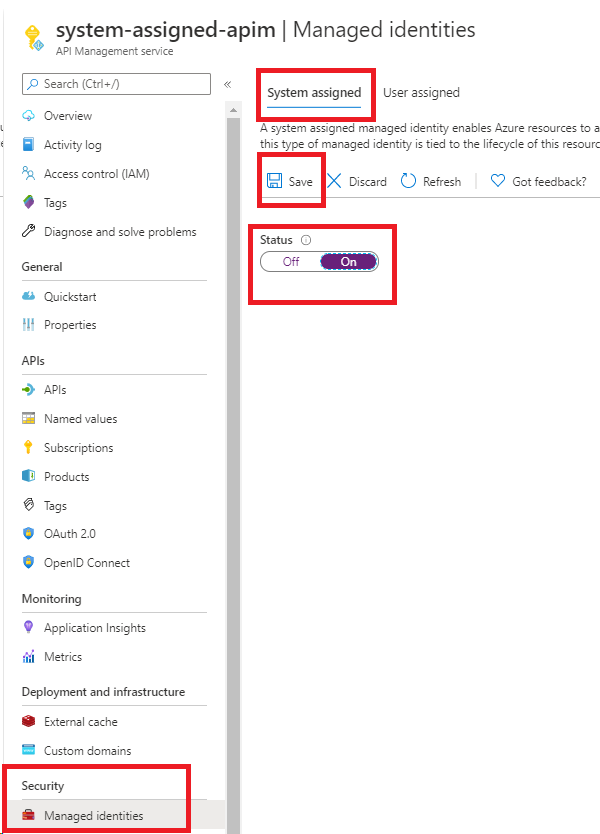
在左侧菜单中,在“安全性”下,选择“托管身份”。
在 “系统分配 ”选项卡上,将 “状态 ”更改为 “打开”。 选择“保存” 。
Azure PowerShell
注意事项
建议使用 Azure Az PowerShell 模块与Azure交互。 若要开始,请参阅安装 Azure PowerShell。 若要了解如何迁移到 Az PowerShell 模块,请参阅 Migrate Azure PowerShell从 AzureRM 迁移到 Az。
以下步骤将引导你创建 API 管理实例并使用Azure PowerShell为其分配标识。
如果需要,请按照 Azure PowerShell 指南中的说明安装Azure PowerShell。 然后运行
Connect-AzAccount -Environment AzureChinaCloud以创建与Azure的连接。使用以下代码创建具有系统分配的托管标识的实例。 有关如何将Azure PowerShell与 API 管理配合使用的更多示例,请参阅 API 管理 PowerShell 示例。
# Create a resource group.
New-AzResourceGroup -Name $resourceGroupName -Location $location

# Create an API Management Consumption SKU service.
New-AzApiManagement -ResourceGroupName $resourceGroupName -Name consumptionskuservice -Location $location -Sku Consumption -Organization contoso -AdminEmail contoso@contoso.com -SystemAssignedIdentity
你还可以更新现有实例以创建标识:
# Get an API Management instance
$apimService = Get-AzApiManagement -ResourceGroupName $resourceGroupName -Name $apiManagementName

# Update an API Management instance
Set-AzApiManagement -InputObject $apimService -SystemAssignedIdentity
Azure 资源管理器 (ARM) 模板
可以通过在 ARM 模板资源定义中包含以下属性来创建具有系统分配标识的API Management实例:
"identity" : {
    "type" : "SystemAssigned"
}
此属性指示Azure为 API 管理实例创建和管理标识。
例如,完整的 ARM 模板可能如以下示例所示:
{
    "$schema": "https://schema.management.azure.com/schemas/2019-04-01/deploymentTemplate.json#",
    "contentVersion": "0.9.0.0",
    "resources": [{
        "apiVersion": "2021-08-01",
        "name": "contoso",
        "type": "Microsoft.ApiManagement/service",
        "location": "[resourceGroup().location]",
        "tags": {},
        "sku": {
            "name": "Developer",
            "capacity": "1"
        },
        "properties": {
            "publisherEmail": "admin@contoso.com",
            "publisherName": "Contoso"
        },
        "identity": {
            "type": "systemAssigned"
        }
    }]
}
创建实例后,它具有以下附加属性:
"identity": {
    "type": "SystemAssigned",
    "tenantId": "<TENANTID>",
    "principalId": "<PRINCIPALID>"
}
tenantId 属性标识身份属于哪个 Microsoft Entra 租户。
principalId 属性是实例的新标识的唯一标识符。 在Microsoft Entra ID中,服务主体的名称与向 API 管理实例提供的名称相同。
注意事项
API Management实例可以同时具有系统分配的标识和用户分配的标识。 在这种情况下,该 type 属性为 SystemAssigned,UserAssigned.
使用托管身份标识配置密钥保管库访问
若要使用 API 管理从Azure密钥保管库访问证书或其他机密,请配置以下设置。
配置访问权限到密钥保管库
- 在 Azure 门户中,转到您的密钥保管库。
- 在左侧菜单中,选择设置>访问配置。 记下配置的权限模型。
- 根据权限模型,为 API 管理托管标识配置 Key Vault 访问策略或 Azure RBAC 访问。
添加密钥保管库的访问策略:
- 在左侧菜单中,选择访问策略。
- 在访问策略页上,选择+ 创建。
- 在“ 权限 ”选项卡上的“ 机密权限”下,选择“ 获取 和 列出”,然后选择“ 下一步”。
- 在“主体”选项卡上搜索托管标识的资源名称,然后选择“下一步”。 如果您使用的是系统自动分配的身份,则主体是您的 API Management 实例的名称。
- 再次选择“下一步”。 在“查看 + 创建”选项卡上,选择“创建”。
配置 Azure RBAC 访问:
- 在左侧菜单中,选择Access control(IAM)。
- 在 Access control (IAM) 页上,选择添加角色分配。
- 在Role选项卡上,选择“密钥保管库 Secrets User”。
- 在成员选项卡上,选择托管身份>+ 选择成员。
- 在“选择托管标识窗口中,选择系统分配的托管标识或与API Management实例关联的用户分配的托管标识,然后单击选择。
- 选择‹查看 + 分配›
密钥保管库防火墙的要求
如果在key vault上启用了 密钥保管库 防火墙,则必须满足以下要求:
必须使用 API 管理实例的系统分配的托管标识来访问密钥保管库。 不能使用用户分配的标识来通过 API 管理功能进行访问。
在密钥保管库防火墙中,启用 Allow Trusted Microsoft Services 以绕过此防火墙选项:
- 在密钥保管库中,选择 “设置>网络”。
- 在 “防火墙和虚拟网络”下,选择“ 允许来自特定虚拟网络和 IP 地址的公共访问”。
- 在 “例外”下,选择“ 允许受信任的Microsoft服务绕过此防火墙”。
API Management支持信任服务连接,以访问控制平面选项的密钥保管库。
确保允许本地客户端 IP 地址暂时访问密钥保管库。 您必须选择一个证书或机密以添加到 Azure API 管理中。 有关详细信息,请参阅 配置Azure 密钥保管库网络设置。
完成配置后,可以在密钥保管库防火墙中阻止客户端地址。
虚拟网络要求
如果API Management实例部署在virtual network中,还配置以下网络设置:
- 在 API 管理子网上启用一个 服务终结点以连接到 密钥保管库。
- 配置网络安全组 (NSG) 规则,允许发往
AzureKeyVault和AzureActiveDirectory服务标记的出站流量。
有关详细信息,请参阅 在虚拟网络中设置 API 管理时的网络配置。
支持使用系统分配标识的场景
以下列表显示了在Azure API 管理中使用系统分配的托管标识的一些常见方案。
从 密钥保管库 获取 API 管理实例的自定义 TLS/SSL 证书
可以使用 API 管理实例的系统分配标识来检索存储在密钥保管库中的自定义 TLS/SSL 证书。 然后,可以将这些证书分配给API Management实例中的自定义域。 请考虑以下几点:
- 机密的内容类型必须是 application/x-pkcs12。 有关详细信息,请参阅 域证书选项。
- 必须使用包含机密的密钥保管库证书机密终结点。
重要
如果未提供证书的对象版本,API 管理会在密钥保管库中更新后四小时内自动获取证书的任何较新版本。
以下示例演示了一个 ARM 模板,该模板使用 API 管理实例的系统分配托管标识从密钥保管库检索自定义域证书。
先决条件
- 一个配置了系统分配托管标识的 API 管理实例。 若要创建实例,可以使用 Azure 快速入门模板。
- 同一资源组中的密钥保管库实例。 实例必须托管在 API 管理中用作自定义域证书的证书。
该模板包含以下步骤:
- 更新密钥保管库实例的访问策略,并允许 API 管理实例从中获取机密。
- 通过从 密钥保管库 实例中获取证书来设置自定义域名,以更新 API 管理实例。
运行模板时,请提供适合你的环境的参数值。
{
	"$schema": "https://schema.management.azure.com/schemas/2019-04-01/deploymentTemplate.json#",
	"contentVersion": "1.0.0.0",
	"parameters": {
        "apiManagementServiceName": {
            "type": "string",
            "minLength": 8,
            "metadata":{
                "description": "The name of the API Management instance"
            }
        },
		"publisherEmail": {
			"type": "string",
			"minLength": 1,
			"metadata": {
				"description": "The email address of the owner of the instance"
			}
		},
		"publisherName": {
			"type": "string",
			"minLength": 1,
			"metadata": {
				"description": "The name of the owner of the instance"
			}
		},
		"sku": {
			"type": "string",
			"allowedValues": ["Developer",
			"Standard",
			"Premium"],
			"defaultValue": "Developer",
			"metadata": {
				"description": "The pricing tier of the API Management instance"
			}
		},
		"skuCount": {
			"type": "int",
			"defaultValue": 1,
			"metadata": {
				"description": "The instance size of the API Management instance"
			}
		},
        "keyVaultName": {
            "type": "string",
            "metadata": {
                "description": "The name of the key vault"
            }
        },
		"proxyCustomHostname1": {
			"type": "string",
			"metadata": {
				"description": "Gateway custom hostname 1. Example: api.contoso.com"
			}
		},
		"keyVaultIdToCertificate": {
			"type": "string",
			"metadata": {
				"description": "Reference to the key vault certificate. Example: https://contoso.vault.azure.cn/secrets/contosogatewaycertificate"
			}
		}
	},
	 "variables": {
        "apimServiceIdentityResourceId": "[concat(resourceId('Microsoft.ApiManagement/service', parameters('apiManagementServiceName')),'/providers/Microsoft.ManagedIdentity/Identities/default')]"
		    },
	"resources": [
   {
        "apiVersion": "2021-08-01",
        "name": "[parameters('apiManagementServiceName')]",
        "type": "Microsoft.ApiManagement/service",
        "location": "[resourceGroup().location]",
        "tags": {
        },
        "sku": {
            "name": "[parameters('sku')]",
            "capacity": "[parameters('skuCount')]"
        },
        "properties": {
            "publisherEmail": "[parameters('publisherEmail')]",
            "publisherName": "[parameters('publisherName')]"
        },
        "identity": {
            "type": "systemAssigned"
        }
    },
    {
        "type": "Microsoft.KeyVault/vaults/accessPolicies",
        "name": "[concat(parameters('keyVaultName'), '/add')]",
        "apiVersion": "2018-02-14",
        "properties": {
            "accessPolicies": [{
                "tenantId": "[reference(variables('apimServiceIdentityResourceId'), '2018-11-30').tenantId]",
                "objectId": "[reference(variables('apimServiceIdentityResourceId'), '2018-11-30').principalId]",
                "permissions": {
                     "secrets": ["get", "list"]
                }
            }]
        }
    },
	{
        "apiVersion": "2021-04-01",
		"type": "Microsoft.Resources/deployments",
        "name": "apimWithKeyVault",
		 "dependsOn": [
        "[resourceId('Microsoft.ApiManagement/service', parameters('apiManagementServiceName'))]"
        ],
        "properties": {
            "mode": "incremental",
            "template": {
                "$schema": "http://schema.management.azure.com/schemas/2015-01-01/deploymentTemplate.json#",
				"contentVersion": "1.0.0.0",
				"parameters": {},
				"resources": [{
					"apiVersion": "2021-08-01",
					"name": "[parameters('apiManagementServiceName')]",
					"type": "Microsoft.ApiManagement/service",
					"location": "[resourceGroup().location]",
					"tags": {
					},
					"sku": {
						"name": "[parameters('sku')]",
						"capacity": "[parameters('skuCount')]"
					},
					"properties": {
						"publisherEmail": "[parameters('publisherEmail')]",
						"publisherName": "[parameters('publisherName')]",
						"hostnameConfigurations": [{
							"type": "Proxy",
							"hostName": "[parameters('proxyCustomHostname1')]",
							"keyVaultId": "[parameters('keyVaultIdToCertificate')]"
						}]
					},
					"identity": {
						"type": "systemAssigned"
					}
				}]
		}
		}
	}
]
}
存储和管理来自密钥保管库的命名值
可以使用系统分配的托管标识访问密钥保管库来存储和管理用于 API 管理策略的机密。 有关详细信息,请参阅 在 Azure API 管理 策略中使用命名值。
使用API Management标识向后端进行身份验证
使用系统分配的标识通过 身份验证托管标识 策略向后端服务进行身份验证。 有关使用基于策略的身份验证时的安全注意事项,请参阅 托管标识的安全注意事项。
使用系统分配的托管标识连接到 IP 防火墙后面的Azure资源
API 管理是 Microsoft 对以下资源的受信任服务。 当防火墙启用 Allow Trusted Microsoft Services 以绕过此防火墙设置时,此受信任状态使服务能够连接到防火墙后面的以下资源。 将适当的Azure角色显式分配给资源实例系统分配的托管标识后,实例的访问范围对应于分配给托管标识的Azure角色。
重要
从 2026 年 3 月开始,启用 允许受信任的 Microsoft 服务绕过此防火墙 防火墙设置来实现的受信任服务通过 API 管理网关连接到 Azure 服务的功能将不再受支持。 若要在此更改后继续从API Management网关访问这些服务,请确保选择其他受支持的网络访问选项。 对于控制平面操作,您可以继续使用受信任的服务连接。 了解详细信息。
将事件记录到事件中心
可以配置和使用系统分配的托管标识来访问事件中心,从API管理实例记录事件。 有关详细信息,请参阅 如何在 Azure API 管理 中将事件记录到事件中心。
创建用户分配的托管标识
Azure 门户
若要在门户中设置托管标识,请先创建 API 管理实例并 创建用户分配的标识。 然后完成以下步骤。
转到门户中的 API 管理实例。
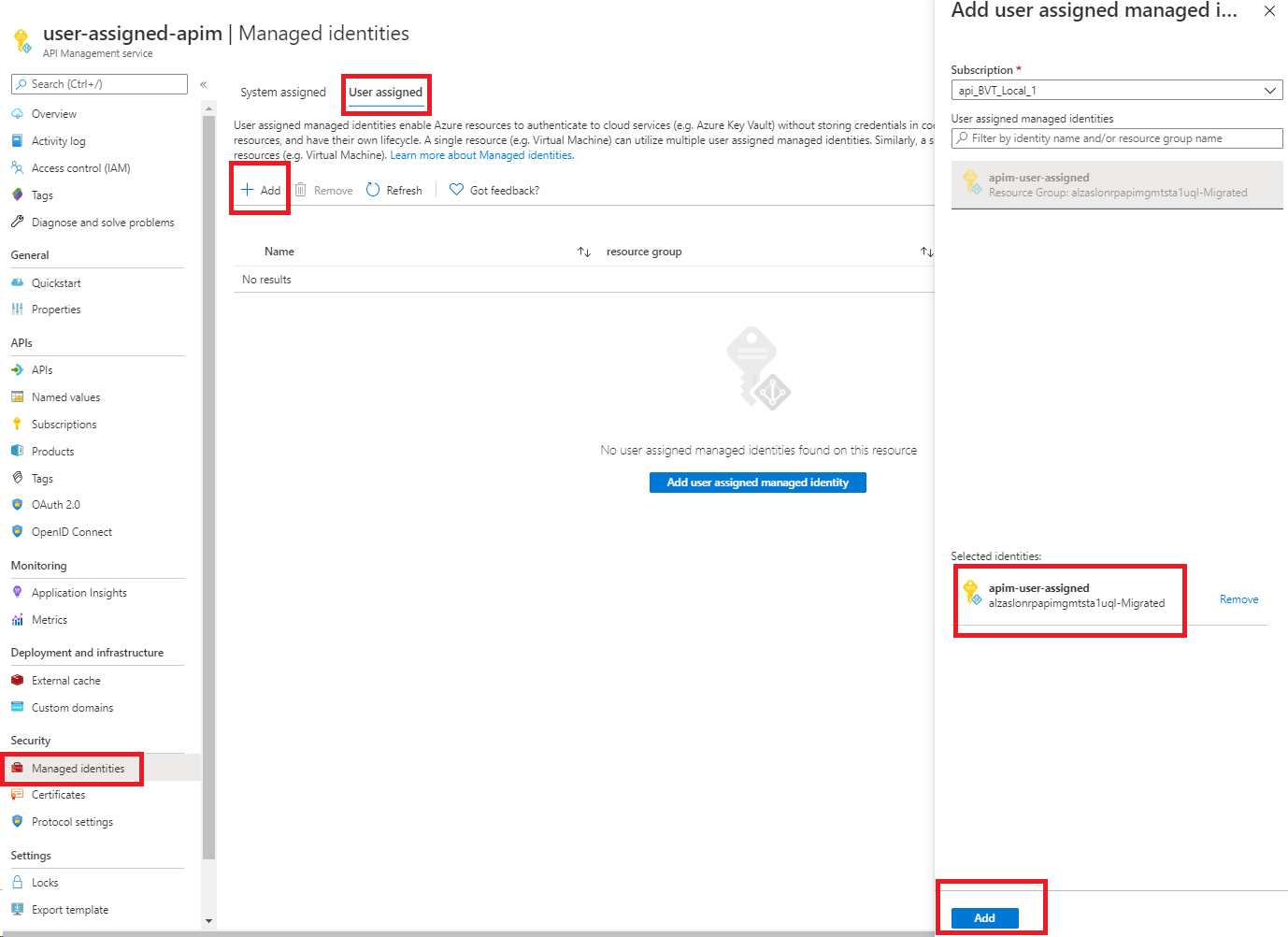
在左侧菜单中,在“安全性”下,选择“托管身份”。
在“用户分配”选项卡上,选择“添加”。
查找之前创建的标识并选择它。 选择“添加” 。
Azure PowerShell
注意事项
建议使用 Azure Az PowerShell 模块与Azure交互。 若要开始,请参阅安装 Azure PowerShell。 若要了解如何迁移到 Az PowerShell 模块,请参阅 Migrate Azure PowerShell从 AzureRM 迁移到 Az。
以下步骤将引导你创建 API 管理实例并使用Azure PowerShell为其分配标识。
如果需要,请按照 Azure PowerShell 指南中的说明安装Azure PowerShell。 然后运行
Connect-AzAccount -Environment AzureChinaCloud以创建与Azure的连接。使用以下代码创建实例。 有关如何将Azure PowerShell与 API 管理配合使用的更多示例,请参阅 API 管理 PowerShell 示例。
# Create a resource group.
New-AzResourceGroup -Name $resourceGroupName -Location $location

# Create a user-assigned identity. This code requires installation of the Az.ManagedServiceIdentity module.
$userAssignedIdentity = New-AzUserAssignedIdentity -Name $userAssignedIdentityName -ResourceGroupName $resourceGroupName

# Create an API Management Consumption SKU service.
$userIdentities = @($userAssignedIdentity.Id)

New-AzApiManagement -ResourceGroupName $resourceGroupName -Location $location -Name $apiManagementName -Organization contoso -AdminEmail admin@contoso.com -Sku Consumption -UserAssignedIdentity $userIdentities
还可以更新现有服务以向服务分配标识:
# Get an API Management instance.
$apimService = Get-AzApiManagement -ResourceGroupName $resourceGroupName -Name $apiManagementName

# Create a user-assigned identity. This code requires installation of the Az.ManagedServiceIdentity module.
$userAssignedIdentity = New-AzUserAssignedIdentity -Name $userAssignedIdentityName -ResourceGroupName $resourceGroupName

# Update the API Management instance.
$userIdentities = @($userAssignedIdentity.Id)
Set-AzApiManagement -InputObject $apimService -UserAssignedIdentity $userIdentities
ARM 模板
可以通过在资源定义中包含以下属性来创建具有标识的API Management实例:
"identity": {
    "type": "UserAssigned",
    "userAssignedIdentities": {
        "<RESOURCEID>": {}
    }
}
添加用户分配的类型会通知Azure使用为实例指定的用户分配标识。
例如,完整的 ARM 模板可能如以下示例所示:
{
    "$schema": "https://schema.management.azure.com/schemas/2014-04-01-preview/deploymentTemplate.json#",
    "contentVersion": "0.9.0.0",
    "resources": [{
        "apiVersion": "2021-08-01",
        "name": "contoso",
        "type": "Microsoft.ApiManagement/service",
        "location": "[resourceGroup().location]",
        "tags": {},
        "sku": {
            "name": "Developer",
            "capacity": "1"
        },
        "properties": {
            "publisherEmail": "admin@contoso.com",
            "publisherName": "Contoso"
        },
        "identity": {
            "type": "UserAssigned",
             "userAssignedIdentities": {
                "[resourceId('Microsoft.ManagedIdentity/userAssignedIdentities', variables('identityName'))]": {}
             }
        },
         "dependsOn": [
          "[resourceId('Microsoft.ManagedIdentity/userAssignedIdentities', variables('identityName'))]"
        ]
    }]
}
创建服务时,它具有以下附加属性:
"identity": {
    "type": "UserAssigned",
    "userAssignedIdentities": {
        "<RESOURCEID>": {
            "principalId": "<PRINCIPALID>",
            "clientId": "<CLIENTID>"
        }
    }
}
principalId 属性是用于 Microsoft Entra 管理时的身份唯一标识符。
clientId 属性是应用程序的新标识的唯一标识符,用于指定在运行时调用期间要使用的标识。
注意事项
API Management实例可以同时具有系统分配的标识和用户分配的标识。 在这种情况下,该 type 属性为 SystemAssigned,UserAssigned.
支持使用用户分配的托管标识的场景
以下列表显示了在Azure API 管理中使用用户分配的托管标识的一些常见方案。
从 密钥保管库 获取 API 管理实例的自定义 TLS/SSL 证书
可以使用用户分配的标识在 API 管理实例与密钥保管库之间建立信任。 然后,可以使用此信任来检索存储在密钥保管库中的自定义 TLS/SSL 证书。 然后,可以将这些证书分配给API Management实例中的自定义域。
重要
如果在 密钥保管库 中启用 密钥保管库 防火墙,则无法使用用户分配的标识从 API 管理中访问。 必须改用系统分配的身份标识。 有关详细信息,请参阅key vault 防火墙要求部分。
请考虑以下要求:
- 机密的内容类型必须是 application/x-pkcs12。
- 必须使用包含机密的密钥保管库证书机密终结点。
重要
如果未提供证书的对象版本,API 管理会在密钥保管库中更新后四小时内自动获取证书的任何较新版本。
存储和管理来自密钥保管库的命名值
可以使用用户分配的托管标识访问密钥保管库来存储和管理用于 API 管理策略的机密。 有关详细信息,请参阅 在 Azure API 管理 策略中使用命名值。
注意事项
如果在 密钥保管库 中启用 密钥保管库 防火墙,则无法使用用户分配的标识从 API 管理中访问。 必须改用系统分配的身份标识。 有关详细信息,请参阅key vault 防火墙要求部分。
使用用户分配的标识向后端进行身份验证
可以使用用户分配的标识通过 authentication-managed-identity 策略向后端服务进行身份验证。 有关使用基于策略的身份验证时的安全注意事项,请参阅 托管标识的安全注意事项。
将事件记录到事件中心
可以配置和使用用户分配的托管标识来访问事件中心,以记录来自 API 管理实例的事件。 有关详细信息,请参阅 如何在 Azure API 管理 中将事件记录到Azure 事件中心。
托管身份的安全注意事项
在 API 管理中使用托管标识时,请务必遵循安全最佳做法来保护资源并最大程度地降低风险:
注意
策略编辑访问权限授予间接资源访问权限: 有权编辑 API 管理策略的用户(例如,分配了 API 管理服务参与者 角色或具有 Microsoft.ApiManagement/service/apis/write 或 Microsoft.ApiManagement/service/apis/policies/write 权限的任何自定义角色)的用户可以使用 authentication-managed-identity 策略作为服务的托管标识进行身份验证。 用户不能仅凭拥有策略编辑权限直接获得对资源的访问权限。 但是,他们可以修改策略以泄露身份验证令牌,将其传播到后端服务,或将其记录供以后使用,从而获得对托管标识可以访问的资源的间接访问。
若要缓解此风险,
- 将 Azure 角色分配到托管标识时,请遵循 最低特权原则 。 仅授予服务所需的权限。
- 仅将 API 管理参与者角色或策略编辑权限(例如
Microsoft.ApiManagement/service/apis/write和Microsoft.ApiManagement/service/apis/policies/write)分配给受信任的用户。 - 定期查看和审核托管标识角色分配,并监视谁有权编辑 API 管理策略。
- 实施策略控制和治理,防止对关键策略进行未经授权的修改。
重要
令牌转发是客户的责任: 使用 authentication-managed-identity 策略时,API 管理从 Microsoft Entra ID 获取令牌,并将其“原样”转发到后端的 Authorization 标头中。 API 管理 不会 验证令牌发送到的后端。 客户负责确保令牌仅转发到预期和受信任的后端服务。 仔细配置 后端实体 和 策略 ,以防止将令牌发送到意外目标。
删除身份
可以通过门户或 ARM 模板禁用该功能来删除系统分配的身份,就像创建时一样。 可以单独删除用户分配的标识。 若要删除所有标识,请将标识类型设置为 "None"。
删除系统分配的标识时,还会将其从Microsoft Entra ID中删除。 删除 API 管理实例时,系统分配的标识会自动从Microsoft Entra ID中删除。
若要使用 ARM 模板删除所有标识,请更新本部分:
"identity": {
    "type": "None"
}
重要
如果使用来自密钥保管库的自定义 SSL 证书配置 API 管理实例,并尝试禁用托管标识,请求将失败。
可以通过从密钥保管库证书切换到内联编码的证书,然后禁用托管标识来解决此问题。 有关详细信息,请参阅 配置自定义域。