Note
Access to this page requires authorization. You can try signing in or changing directories.
Access to this page requires authorization. You can try changing directories.
Azure Monitor Application Insights is an application performance monitoring (APM) feature of Azure Monitor. For supported scenarios, you can use OpenTelemetry (OTel), a vendor-neutral observability framework, to instrument your applications and collect telemetry data, then analyze that telemetry in Application Insights.
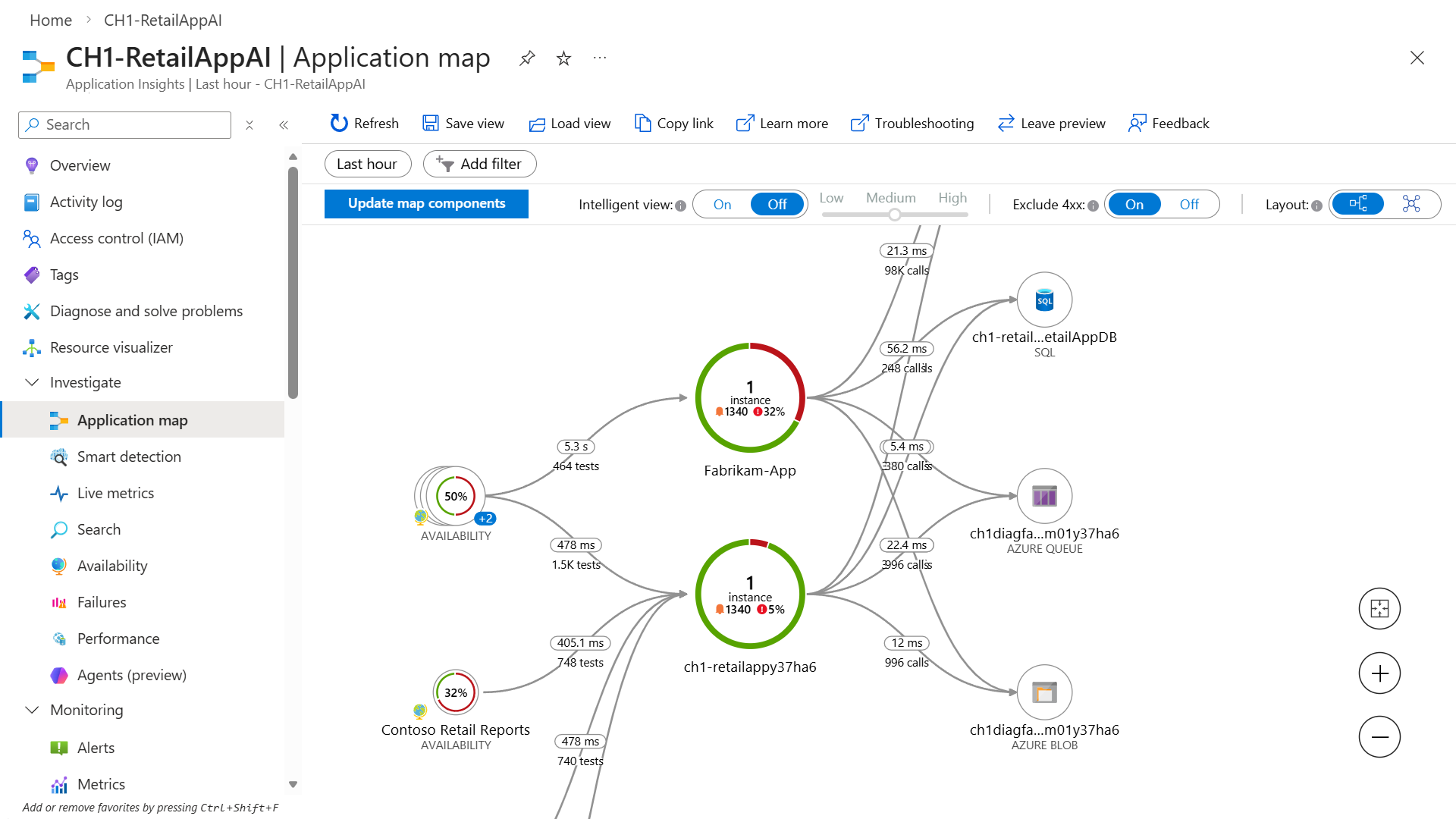
Application Insights Experiences
Application Insights supports OpenTelemetry (OTel) to collect telemetry data in a standardized format across platforms. Integration with Azure services allows for efficient monitoring and diagnostics, improving application observability and performance.
Investigate
Use these tools to diagnose issues and understand your application's runtime behavior.
- Application dashboard: An at-a-glance assessment of your application's health and performance.
- Application map: A visual overview of application architecture and components' interactions.
- Live metrics: A real-time analytics dashboard for insight into application activity and performance.
- Search view: Trace and diagnose transactions to identify issues and optimize performance.
- Availability view: Proactively monitor and test the availability and responsiveness of application endpoints.
- Failures view: Identify and analyze failures in your application to minimize downtime.
- Performance view: Review application performance metrics and potential bottlenecks.
Monitoring
Use these tools to continuously track your application's health and set up proactive notifications.
- Alerts: Monitor a wide range of aspects of your application and trigger various actions.
- Metrics: Dive deep into metrics data to understand usage patterns and trends.
- Diagnostic settings: Configure streaming export of platform logs and metrics to the destination of your choice.
- Logs: Retrieve, consolidate, and analyze all data collected into Azure Monitoring Logs.
- Workbooks: Create interactive reports and dashboards that visualize application monitoring data.
- SDK Stats: Visualize exporter success, dropped counts, retry counts, and drop reasons from Application Insights SDKs and agents.
Usage
Use these tools to understand how users interact with your application.
- Users, sessions, and events: Determine when, where, and how users interact with your web app.
- Funnels: Analyze conversion rates to identify where users progress or drop off in the funnel.
- Flows: Visualize user paths on your site to identify high engagement areas and exit points.
- Cohorts: Group users by shared characteristics to simplify trend identification, segmentation, and performance troubleshooting.
Code analysis
Use these tools to profile and debug your application code.
- .NET Profiler: Capture, identify, and view performance traces for your application.
- Snapshot debugger: Automatically collect debug snapshots when exceptions occur in .NET application
Logic model
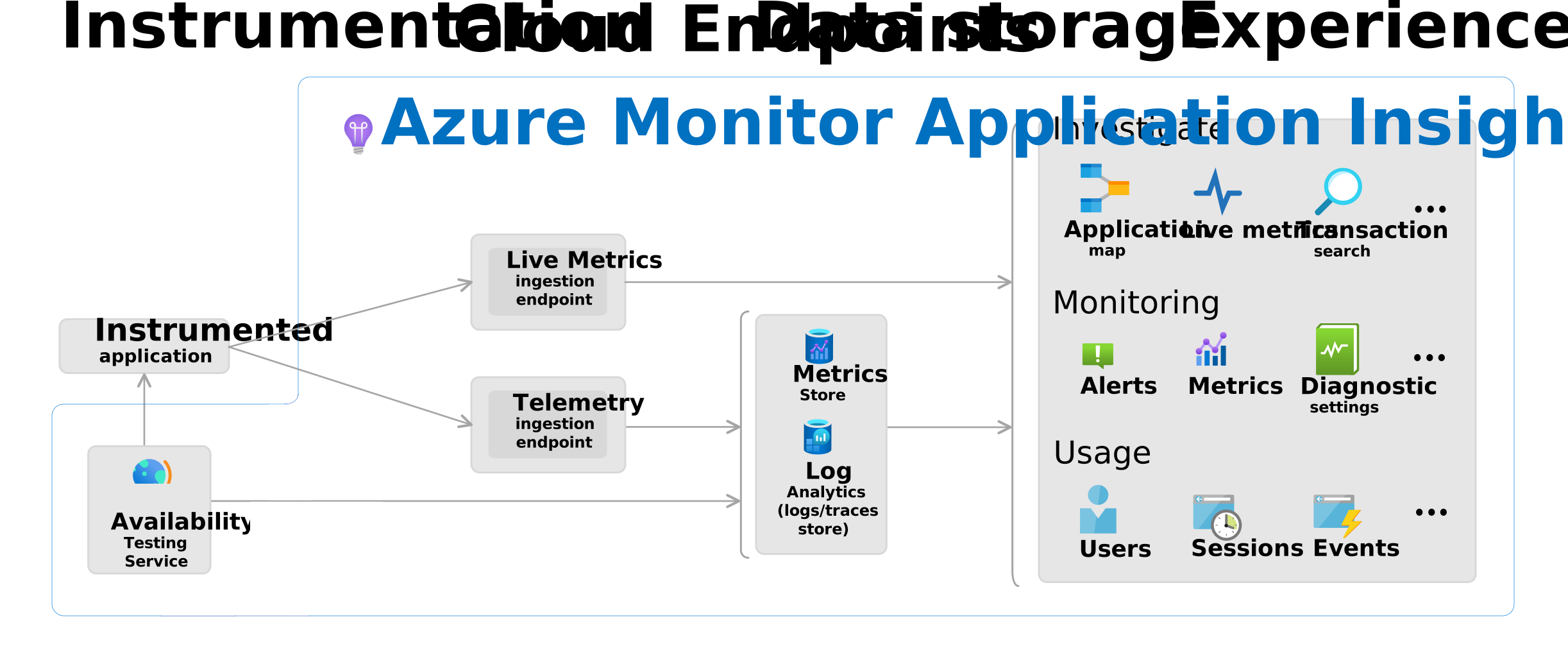
The logic model diagram visualizes components of Application Insights and how they interact.
Note
Firewall settings must be adjusted for data to reach ingestion endpoints. For more information, see Azure Monitor endpoint access and firewall configuration.
Getting started
This section covers getting started with OpenTelemetry-based data collection in Azure Monitor Application Insights.
Entry points include:
- Server-side web apps
- Server-side web apps hosted on a Virtual Machine (VM)
- Client-side JavaScript apps
- Azure Functions
- AI Agents
Tip
- For most code-based server-side scenarios, the recommended setup uses the Azure Monitor OpenTelemetry Distro.
- Scenarios where OpenTelemetry isn't available are clearly identified.
Choose the tab that best matches your workload or hosting model. Each tab shows the recommended data-collection path for that scenario.
Set up data collection
Use this path for server-side web apps that you instrument in code.
- Create an Application Insights resource.
- Get the resource's connection string.
- Add the Azure Monitor OpenTelemetry Distro to your app.
- Configure the connection string.
Tip
Some platforms enable data collection automatically through automatic instrumentation. Switch to code-based instrumentation with the Azure Monitor OpenTelemetry Distro if you want more configuration and extensibility options.
After you complete the setup for your scenario, run your app and wait a few minutes for telemetry to appear in Application Insights. Then explore Application Insights experiences.
Important
If you're migrating from older Application Insights SDKs, see Migrate to Azure Monitor OpenTelemetry.
Other OpenTelemetry integrations on Azure
Azure Monitor Application Insights integrates with other Azure services that use OpenTelemetry. Use the following resources for Azure services, software development kits (SDKs), and tools that use OpenTelemetry:
| Integration | Description |
|---|---|
| Azure SDK semantic conventions | OpenTelemetry attribute naming conventions used across all Azure SDKs. |
| Java tracing in the Azure SDK | Distributed tracing support for Azure SDK for Java clients. |
| Azure Cosmos DB SDK observability | OpenTelemetry traces and metrics emitted by the Azure Cosmos DB SDK. |
| .NET observability with OpenTelemetry | OpenTelemetry instrumentation guidance for .NET applications. |
| OpenTelemetry ingestion into Azure Data Explorer | Ingest OpenTelemetry data into Azure Data Explorer, Synapse Data Explorer, and Real-Time Intelligence. |
| Azure Container Apps OpenTelemetry agent | Built-in OpenTelemetry agent for Azure Container Apps. |
| Aspire dashboard | Local development dashboard for viewing OpenTelemetry traces and metrics from .NET Aspire apps. |
Troubleshooting
For assistance with troubleshooting Application Insights, see our dedicated troubleshooting documentation.
Help and support
Azure technical support
For Azure support issues, open an Azure support ticket.
General Questions
Post general questions to the Azure Questions and Answers forum.
Coding Questions
Post coding questions to Stack Overflow by using an azure-application-insights tag.
Feedback Community
Leave product feedback for the engineering team in the Feedback Community.