Note
Access to this page requires authorization. You can try signing in or changing directories.
Access to this page requires authorization. You can try changing directories.
Azure Container Registry gives you the option to set a retention policy for stored image manifests that don't have any associated tags. When you enable a retention policy, the registry automatically deletes untagged manifests after the number of days you set. This feature prevents the registry from filling up with unneeded artifacts and helps you save on storage costs.
To set a retention policy for untagged manifests, use the Azure portal or the Azure CLI. For the Azure CLI, run commands in a local installation with the latest version of the Azure CLI. To install or upgrade, see How to install the Azure CLI.
A retention policy for untagged manifests is currently a preview feature of container registries with the Premium pricing plan. For information about registry pricing plans (SKUs), see Azure Container Registry SKU features and limits.
Warning
Set a retention policy with care; deleted image data is unrecoverable. If you have systems that pull images by manifest digest (as opposed to image name), don't set a retention policy for untagged manifests. Deleting untagged images prevents those systems from pulling the images from your registry. Instead of pulling by manifest, consider adopting a unique tag scheme, a recommended best practice.
How the retention policy works
Azure Container Registry does reference counting for manifests in the registry. When you untag a manifest, the registry checks to see if there's a retention policy. If a retention policy is enabled, and the delete-enabled attribute of the manifest is set to true, the registry schedules a manifest delete operation for a specific date and time, according to the number of days set in the retention policy.
As an example, suppose you untagged two manifests, one hour apart, in a registry with a retention policy of 30 days. The registry schedules delete operations for each of the manifests. Then, 30 days later, approximately one hour apart, both manifests are deleted, unless the retention policy is disabled before the scheduled deletion date.
You can exclude untagged manifests from being deleted by a retention policy by setting its delete-enabled attribute to false. For more information, see Lock a container image in an Azure container registry.
Important
The retention policy applies only to untagged manifests with timestamps after the policy is enabled. Untagged manifests in the registry with earlier timestamps aren't subject to the policy. For other options to delete image data, see examples in Delete container images in Azure Container Registry.
Untagged manifests that use OCI media types like application/vnd.oci.image.manifest.v1+json or application/vnd.oci.image.index.v1+json aren't supported by the retention policy. Only docker manifests are supported, including application/vnd.docker.distribution.manifest.v2+json and application/vnd.docker.distribution.manifest.list.v2+json. To clean up untagged OCI manifests, use the acr purge command.
Set a retention policy
By default, container registries don't have a retention policy for untagged manifests. To set or update a retention policy, use either the Azure CLI or the Azure portal.
The default retention period for a retention policy is seven days, but you can specify any number of days between 0 and 365. After the retention period, the registry automatically deletes untagged manifests. Setting the value to 0 removes untagged manifests as soon as they become untagged.
Set or update a retention policy
To set or update a retention policy, run the az acr config retention update command.
The following example sets a retention policy of 30 days for untagged manifests in the registry myregistry:
az acr config retention update --registry myregistry --status enabled --days 30 --type UntaggedManifests
Verify the retention policy
If you enable a retention policy with a retention period of 0 days, you can quickly verify that untagged manifests are deleted:
Push a test image
hello-world:latestimage to your registry, or substitute another test image of your choice.Untag the
hello-world:latestimage by using the az acr repository untag command. This command doesn't delete the untagged manifest from the registry.az acr repository untag \ --name myregistry --image hello-world:latestWithin a few seconds, because of your retention policy, the untagged manifest is deleted. Use the az acr manifest list-metadata command to list all manifests in the repository, and confirm that your test image is no longer listed. If the test image was the only one in the repository, the repository itself is also deleted.
Show the retention policy
To show the retention policy set in a registry, run the az acr config retention show command:
az acr config retention show --registry myregistry
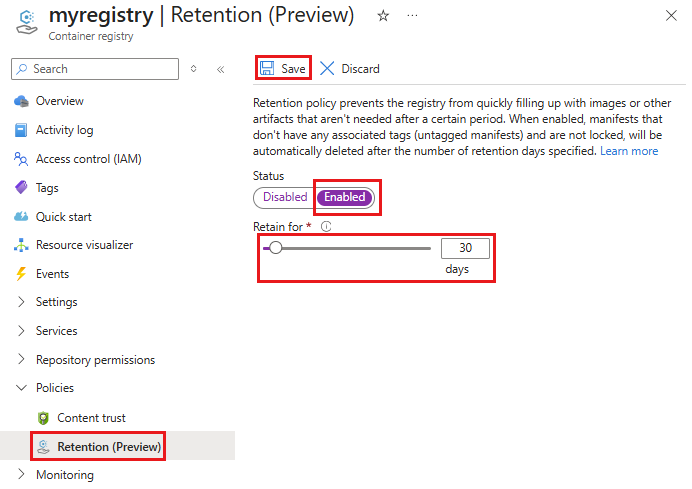
Disable a retention policy
To disable a retention policy in a registry, run the az acr config retention update command and set --status disabled:
az acr config retention update \
  --registry myregistry --status disabled \
  --type UntaggedManifests
Related content
- Learn about options to delete images and repositories in Azure Container Registry.
- Learn how to automatically purge selected images and manifests from a registry.
- Learn about options to lock images and manifests in a registry.